Building the DMZ between you and critical private cloud infrastructure.
Written by Joe Tietz
In my previous post, we explored how the emergence of autonomous, offensive AI models like Claude Mythos Preview has compressed the vulnerability lifecycle from months to hours. We established that securing the VCF 9.1 Management Domain requires strict adherence to NIST 800-207 (Zero Trust) and utilizing the vDefend Distributed Firewall (DFW).
But micro-segmentation is only the first step. When facing an adversary that can autonomously generate infinite variations of a single exploit, a simple “allow/deny” port-based firewall isn’t enough. We need Holistic Security. We need VMware vDefend Advanced Threat Prevention (ATP).
Stopping the Onslaught of New Vulnerabilities
One of the most dangerous capabilities of modern AI threat actors is payload mutation. If an AI discovers a vulnerability in vCenter or SDDC Manager, it won’t just write one exploit; it will generate thousands of polymorphic variants designed to bypass traditional, hash-based antivirus and legacy firewalls.
This is where vDefend IDPS (Intrusion Detection and Prevention System) becomes the ultimate equalizer. By focusing on the core behavior and protocol anomalies of an attack rather than just static indicators of compromise (IoCs), vDefend IDPS enables true Virtual Patching.
When an AI-driven attack launches an onslaught of new vulnerabilities against your infrastructure, vDefend IDPS signatures act as an impenetrable shield. Because the IDPS engine sits directly at the vNIC of the workload via the hypervisor, it inspects every packet at line rate (supercharged by VCF 9.1’s Turbo Mode). It doesn’t matter if the AI mutated the payload wrapper 500 different ways; the IDPS catches the underlying exploit mechanism—whether it’s a command injection or a heap-overflow—and drops the traffic instantly. It buys your infrastructure team the critical time needed to test and deploy official patches without leaving the VCF Core exposed.
The Jump Box Story: A Fortress for the Keys to the Kingdom
To truly understand how holistic security operates in VCF 9.1, let’s look at the most critical access point in your environment: The Administrative Jump Box.
We’ve established a “Default Deny” posture around the VCF Management Plane. So, how do your authorized admins actually manage the environment? They use a dedicated jump box, but in the Mythos era, a jump box cannot just be a Windows Server with RDP enabled. It must be a fortress guarded by layered, intelligent security.
Here is an architecture to secure the workflow from end to end:
1. Getting on the Box: Elevated Credentials and MFA The first perimeter is access to the jump box itself. This is governed by strict identity access management. An administrator cannot simply log in with their daily-driver email account; they must use dedicated, elevated credentials (e.g., a VCF-Admin account). This access is explicitly gated by Multi-Factor Authentication (MFA). If you don’t have the token, you don’t get a session on the jump box. Period.
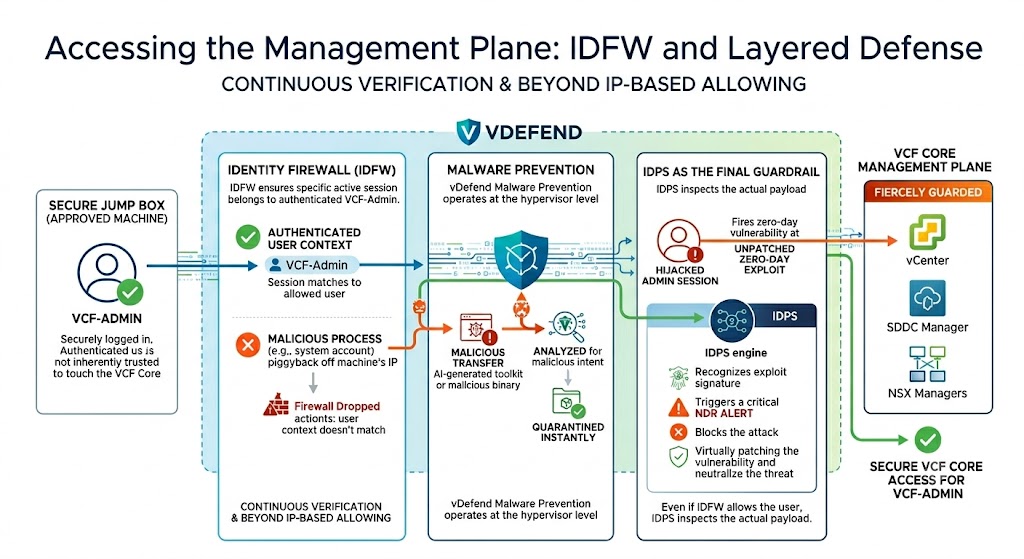
2. Accessing the Management Plane: IDFW and Layered Defense Once the admin is securely logged into the jump box, they are still not inherently trusted to touch the VCF Core. Access from the jump box to the Management Plane (vCenter, SDDC Manager, NSX Managers) is fiercely guarded by vDefend. It isn’t just about allowing an IP address; it’s about holistic, continuous verification:
- Identity Firewall (IDFW): Even though the jump box is an approved machine, IDFW ensures that the specific active session attempting to connect to vCenter belongs to the authenticated
VCF-Admin. If a malicious process running under a system account tries to piggyback off the machine’s IP, the firewall drops it because the user context doesn’t match. - Malware Prevention: As traffic flows from the jump box into the Management Plane, vDefend Malware Prevention operates at the hypervisor level. If a compromised jump box attempts to transfer an AI-generated toolkit or a malicious binary into the management environment, it is intercepted, analyzed for malicious intent, and quarantined instantly.
- IDPS as the Final Guardrail: Let’s say an attacker manages to hijack an admin session and attempts a “living off the land” attack or fires an unpatched zero-day exploit straight from the jump box at vCenter. The traffic must pass through the vDefend IDPS engine. Even though the IDFW allows the user to talk to vCenter, IDPS inspects the actual payload. It recognizes the exploit signature, triggers a critical NDR alert, and that can feed our SEIM/SOAR to block the attack. Neutralizing the threat even when it originates from an approved, authenticated source.
Example: Jump Box IDPS Policy Table
To visualize how this looks in the vDefend console, here is an example of a strict IDPS rule set applied specifically to the Jump Box security group:
| Rule Name | Source | Destination | Service | IDPS Profile Focus | Action |
|---|---|---|---|---|---|
| Management Plane Inspection | sg-admin-jumpboxes | sg-vcf-management | HTTPS, SSH | Strict Prevention: Critical CVEs, Exploit Kits, Command Injection | Prevent (Drop) |
| Block Outbound C2 Traffic | sg-admin-jumpboxes | Internet / Any | ANY | Malware / C2: Known Beacons, Malicious Domains, Exfiltration | Prevent (Drop) |
| Anti-Lateral Movement | Any Internal | sg-admin-jumpboxes | RDP, SSH, WinRM | Suspicious Activity: Brute Force, Credential Dumping, Mimikatz | Prevent (Drop) |
Defending the VCF 9.1 Core Part II: Holistic Security, The Jump Box, and Stopping the Vulnerability Onslaught
The Foundation: Securing Physical VLANs and OOB Networks
While vDefend secures the hypervisor and virtual management plane, a holistic security strategy must also account for the bare metal. The physical infrastructure powering VCF 9.1—specifically the Out-of-Band (OOB) networks (iDRAC, iLO, BMCs) and physical management VLANs (Top-of-Rack switches)—represents a critical attack surface.
If a threat actor bypasses the virtual layer and gains access to the OOB network, they can manipulate firmware, force hardware-level reboots, or completely wipe the ESXi hosts, rendering your virtual defenses moot.
To mitigate this physical risk, the Zero Trust mindset must extend to the physical switching fabric:
- Strictly Isolated OOB: The OOB network should never be routable from general corporate networks or user VLANs. It must be heavily segmented at the physical core/distribution layers.
- The Jump Box as the Sole Physical Gateway: Just as the Jump Box guards vCenter, it must be the only authorized pathway into the physical management and OOB VLANs.
- Physical ACL Enforcement: Implement strict Access Control Lists (ACLs) on your physical routing layer. Ensure that only traffic originating from the heavily inspected Jump Box environment can reach the ToR switch management IPs and host BMCs.
By forcing physical management traffic through the secure jump box, we ensure that even hardware-level administration is subject to MFA, identity verification, and strict auditing.
Conclusion: The Holistic Imperative
In the era of machine-speed attacks, relying on isolated security products is a losing battle. You cannot bolt security on after the fact.
Holistic security means that Identity (IDFW), Access Control (DFW), Virtual Patching (IDPS), and Malware Prevention are all operating together, inherently baked into the VCF 9.1 hypervisor fabric. By utilizing vDefend , we ensure that even when adversaries unleash an onslaught of new vulnerabilities, our core infrastructure remains resilient, automated, and secure.
What layers of vDefend are you currently utilizing in your environment? Drop a comment below, and let’s keep the conversation going!


