

Securing the Private Cloud: Micro-Segmenting the VCF 9.1 Management Domain
As a Virtual Infrastructure (VI) Administrator, your primary mandate has historically been availability: keeping the lights on, the workloads running, and performance optimized. However, in the era of VMware Cloud Foundation (VCF) 9.1 and Frontier AI, security is no longer “someone else’s job.” When a security breach occurs, and an attacker moves laterally through a flat management network, the spotlight shines directly on the infrastructure layer. If the virtual network cards (vNICs) of your core management appliances are wide open, you—the VI Admin—become the liable party.
To prevent this, VCF 9.1 embraces a Zero-Trust architecture. Securing your private cloud begins on Day 1, starting with the heart of your infrastructure: the Management Domain.
1. The Agentless Paradox: Securing the Untouchable Plane
Modern enterprise security tools love agents. Endpoint Detection and Response (EDR) agents, configuration management agents, and compliance scanners are often mandated across the estate.
However, no third-party agents are supported or allowed inside the VCF management plane appliances (SDDC Manager, vCenter Server, and NSX Managers).
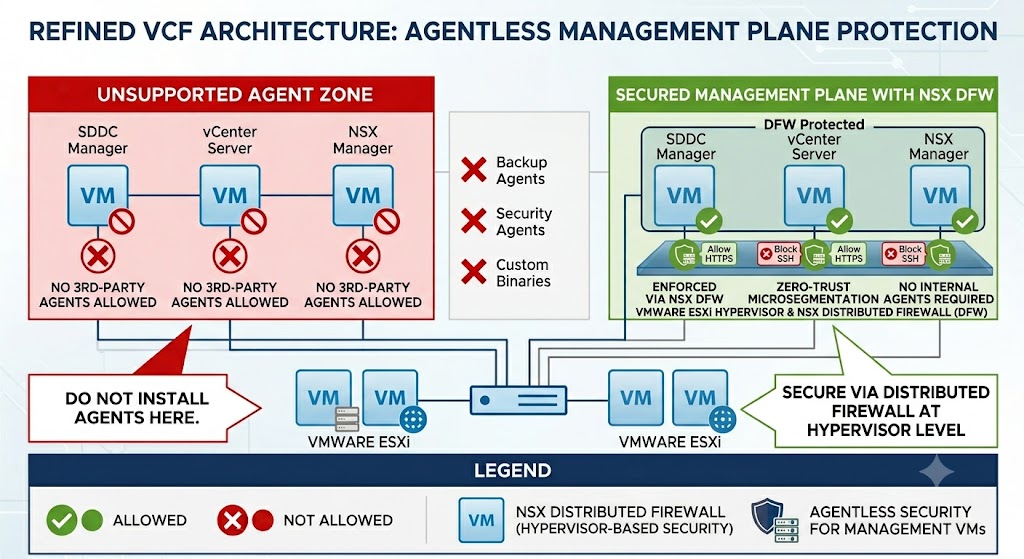
Why? The VCF management plane is highly engineered, tightly integrated, and upgraded as a single, sovereign system. Installing third-party agents directly onto these Photon OS-based appliances risks:
- Breaking critical API endpoints and inter-service communications.
- Causing performance bottlenecks and kernel instability on critical control plane elements.
- Blocking or corrupting lifecycle management (LCM) patching workflows during upgrades.
This is the Agentless Paradox: You must secure a control plane that you are not allowed to touch from the inside.
The solution? You don’t secure the operating system from within; you secure it at the hypervisor level.
2. Dual-Layer Defense: OS Compliance + Hypervisor Enforcement
Securing the Management Domain requires a dual-layer approach. You must implement controls on both the guest Operating System (OS) and the hypervisor-managed virtual NIC (vNIC).
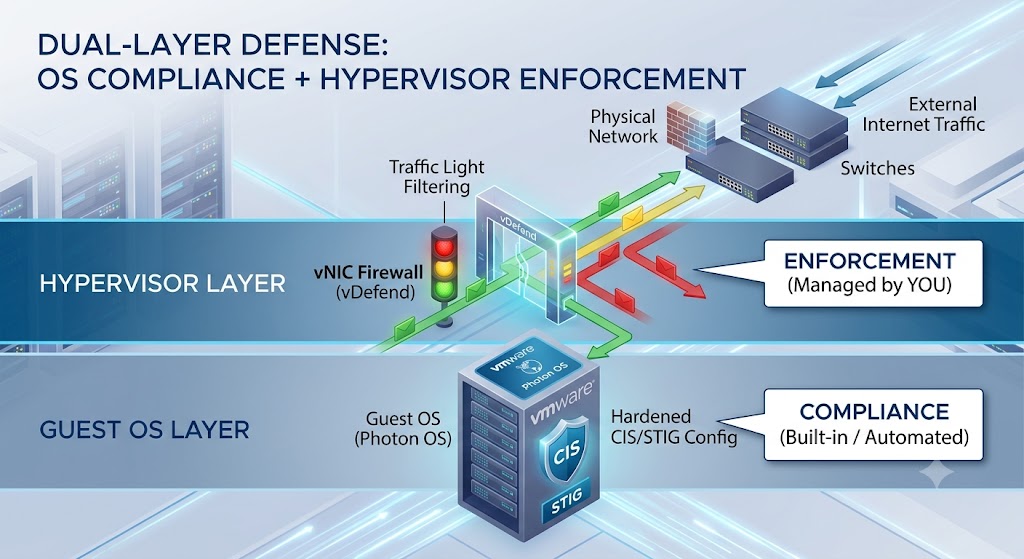
- Guest OS Compliance (The Static Shield): Out of the box, VCF 9.1 appliances are hardened against CIS benchmarks and Federal STIG requirements. Standard settings like SSH timeouts, password complexity, and kernel-level hardening are built into the Photon OS appliances.
- Hypervisor vNIC Enforcement (The Active Moat): This is where you come in. By leveraging the built-in VMware vDefend Distributed Firewall (DFW), you inspect and control every packet entering or leaving the vNIC of your management appliances before it even hits the guest OS network stack.
3. The “Traffic Light” Security Model: Red Means Stop
The concept behind hypervisor-level micro-segmentation is as simple as a traffic light:
- 🔴 Red Traffic (Default Stop): All communication is blocked by default. If a VM tries to talk to another VM laterally on the same management network, it is stopped dead in its tracks.
- 🟢 Green Traffic (Explicitly Allowed): Only verified, pre-approved infrastructure traffic is allowed to pass.
If a rule is not explicitly defined in your “Green” list, it is treated as a “Red” traffic light. This prevents a compromised utility VM or administrative jumpbox from being used to scan, exploit, and laterally infect vCenter or SDDC Manager.
4. Extracting the Blueprints: The VCF Configuration Workbook
Before writing firewall rules, you need the ground truth. This is found in the VCF Configuration Workbook (the deployment parameter spreadsheet completed during the planning phase and used by VCF Installer to orchestrate your Day 0 deployment).
Open your completed workbook and navigate to the following tabs to extract the IPs, hostnames, and subnets needed for your rules:
A. “Management Specs” Tab
Extract the exact IP addresses and Hostnames for your core management appliances:
- SDDC Manager: Look for
sddc-manager-ipandsddc-manager-fqdn. - vCenter Server: Locate
vcenter-ipandvcenter-fqdn. - NSX Managers: Identify the NSX Manager Cluster Virtual IP (VIP) and the three individual controller IPs (
nsx-mgr-01-ip, etc.).
B. “Hosts & Subnets” Tab
Extract your physical infrastructure IPs and network ranges:
- ESXi Management VMkernel IPs: Note down the IP range or individual VMkernel (
vmk0) IP addresses assigned to the physical ESXi hosts running your management workloads. - Management Subnet & Gateway: Note the CIDR block (e.g.,
10.0.10.0/24) and gateway IP for the management network.
C. “External Services” Tab
Extract the corporate infrastructure servers designated during your VCF install:
- Domain Name System (DNS): Primary and secondary DNS IP addresses.
- Network Time Protocol (NTP): Your validated internal or external NTP servers.
- Active Directory (AD) / Identity Providers: Domain Controller IPs used for LDAP/LDAPS configurations. In VCF 9.1, you can also natively integrate with the Symantec Identity Security Platform (IDSP) directly from VCF Operations to enable Multi-Factor Authentication (MFA), FIDO2/WebAuthn, and standardized VCF-level roles.
5. The VCF 9.1 Management Domain Firewall Rules Matrix
Below is the definitive “Traffic Light” rule matrix for your Management Domain. Implement this in your vDefend Distributed Firewall (DFW). In this table I am showing enforcing your VCF confrigruation at the hypervisor network with 9 simple rules. As you read this talbe think about, does my network team or security team own the Vitrual Distubited Switch?
| Rule ID | Rule Name | Source Group | Destination Group | Services / Ports | Action | Description |
|---|---|---|---|---|---|---|
| MGMT-01 | Allow NTP | VCF-Mgmt-Components | NTP-Servers | UDP 123 | ALLOW | Crucial for time synchronization; out-of-sync clocks break SSO tokens and vSAN. |
| MGMT-02 | Allow DNS | VCF-Mgmt-Components | DNS-Servers | UDP 53, TCP 53 | ALLOW | FQDN resolution for all API endpoints, host management, and lookups. |
| MGMT-03 | Allow AD Auth | vCenter-Appliance SDDC-Manager NSX-Managers | Active-Directory | TCP/UDP 389 (LDAP) TCP 636 (LDAPS) TCP 3268/3269 (GC) | ALLOW | Domain controller communications for user authentication and directory services. |
| MGMT-04 | ESXi to vCenter | ESXi-Hosts | vCenter-Appliance | TCP 443 TCP/UDP 902 | ALLOW | Core host management, agent heartbeat, and provisioning. |
| MGMT-05 | vCenter to ESXi | vCenter-Appliance | ESXi-Hosts | TCP 443 TCP/UDP 902 | ALLOW | vCenter dispatching tasks to ESXi, hosting consoles, and VM migrations. |
| MGMT-06 | SDDC Manager Orchestration | SDDC-Manager | vCenter-Appliance NSX-Managers ESXi-Hosts | TCP 443 (HTTPS) TCP 22 (SSH – temporary) | ALLOW | Day-2 operations, lifecycle management, and resource provisioning. |
| MGMT-07 | Syslog / Monitoring | VCF-Mgmt-Components | Syslog-Servers | TCP/UDP 514 TCP 1514 | ALLOW | Audit log forwarders to VCF Operations / external SIEM platforms. |
| MGMT-08 | Restricted Admin UI | Admin-Jumpboxes | VCF-Mgmt-Components | TCP 443 (HTTPS) TCP 22 (SSH) | ALLOW | Encrypted administrative portal access. Never expose management interfaces to general user subnets. |
| MGMT-09 | DEFAULT DROP (The Red Light) | VCF-Mgmt-Subnet | VCF-Mgmt-Subnet | ANY | 🛑 DROP | The Default Block Rule. Prevents unauthorized lateral communication inside the management network. |
6. Step-by-Step Implementation Guide
Follow this systematic process to safely configure and apply these rules in your VCF 9.1 environment without causing a self-inflicted outage.
Step 1: Create NSX Inventory Groups
Instead of writing rules using raw IP addresses, define reusable Groups inside NSX to keep your configuration clean and dynamic.
- Log into your NSX Manager / vDefend Console.
- Navigate to Inventory > Groups and click Add Group.
- Create the following groups by adding IP addresses extracted from your VCF Workbook:
Grp-VCF-NTP: Add your NTP server IPs.Grp-VCF-DNS: Add your DNS server IPs.Grp-VCF-AD: Add your Domain Controller IPs.
- Create dynamic groups based on VM tags or names:
Grp-SDDC-Manager: Criteria: VM Name equalssddc-manager.Grp-vCenter: Criteria: VM Name containsvcenter.Grp-NSX-Controllers: Criteria: VM Name containsnsx-manager.
Step 2: Define Custom Services (If Not Built-In)
Most core services (DNS, NTP, LDAPS, HTTPS) have built-in definitions in NSX. Double-check that they exist. If you use non-standard ports (e.g., custom Syslog ports), define them under Inventory > Services > Add Service.
Step 3: Author the “Green Light” Infrastructure Rules
- Navigate to Security > Distributed Firewall.
- Under the Category tab, select Infrastructure (for core network services like NTP, DNS, and AD) or Environment (for application/management relationships).
- Click Add Policy and name it
VCF-Management-Core-Policy. - Click Add Rule and construct the rules in the order shown in our Firewall Rules Matrix above:
- Match the Source Group, Destination Group, and Service.
- Under Action, select Allow.
- Under Applied To, target only the specific management groups (this keeps the firewall engine efficient instead of evaluating every workload VM across your entire fabric).
Step 4: Implement the “Red Light” Default Drop
Before enabling a block rule, verify that all legitimate management traffic is passing without issues by checking the firewall hit counts and logging.
- At the bottom of your Management Policy, add a final catch-all rule:
- Source:
Grp-VCF-Management-Subnet(the CIDR block for your management network). - Destination:
Grp-VCF-Management-Subnet. - Service:
Any. - Action: Drop.
- Logging: Enabled (highly recommended so you can audit blocked traffic).
- Source:
- Click Publish to commit the changes to your ESXi host kernels.
Conclusion: Take Ownership of the Hypervisor Perimeter
In VCF 9.1, securing your private cloud is no longer about layering third-party, resource-heavy agents inside your VM OS. It is about establishing clear, hypervisor-enforced boundaries.
By pulling your structural parameters directly from your VCF Configuration Workbook, translating them into dynamic NSX Groups, and enforcing the Traffic Light Model, you protect your organization from catastrophic lateral network attacks.
Don’t wait for your next compliance audit or a security incident response team to highlight the gaps in your architecture. Hardening the management domain at the hypervisor level is your responsibility. Lock it down today!


Leave a Reply