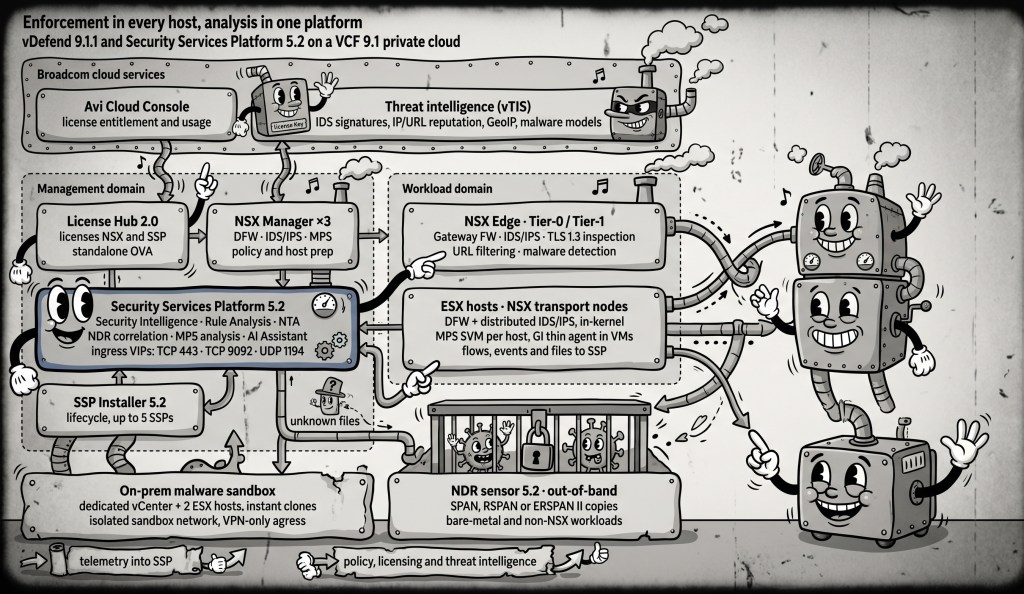
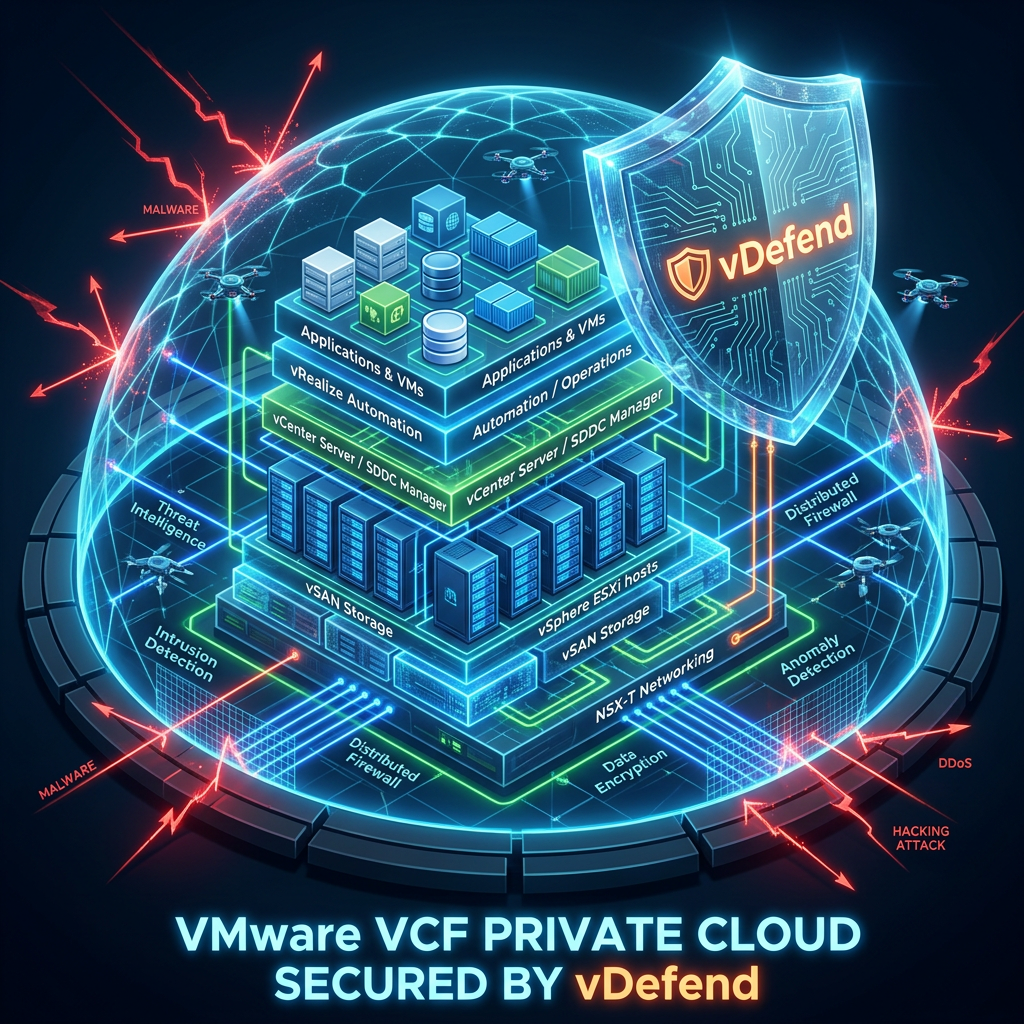
Securing a VMware Cloud Foundation (VCF) private cloud using VMware vDefend (leveraging the NSX and vDefend architecture) involves moving away from perimeter-only network security to a hypervisor-native Zero Trust model.
The step-by-step approach to implementing this security framework across your VCF infrastructure and applications is outlined below.
If you’ve been reading my recent posts on vPSO, you know I care about connecting theoretical security frameworks with real-world use in VMware Cloud Foundation (VCF). We’ve looked at how VMware vDefend serves as the main enforcer for NIST SP 800-53 Rev. 5, NIST SP 800-207 (Zero Trust), and NIST SP 800-82 Rev. 3 (OT/ICS).
Recently, NIST released an important document: NIST SP 800-239 (Initial Public Draft), titled “AI Data Center Security Analysis: A High-Performance Computing (HPC) Driven Approach.” If your organization is building AI infrastructure—whether for fine-tuning Large Language Models (LLMs), Retrieval-Augmented Generation (RAG) pipelines, or real-time inference—this publication is essential reading.
In this post, we’ll explain what NIST SP 800-239 is, why traditional data center security doesn’t work well in AI settings, and how to use VMware Avi Load Balancer (AVI) and VMware vDefend together to achieve the main objectives of this framework.
What is NIST SP 800-239 and Why Is It Different?
Traditional enterprise data centers are built around predictable application tiers (Web -> App -> DB).
AI data centers, however, inherit their architectural DNA from High-Performance Computing (HPC) environments. They feature:
Massive East-West Traffic: Unprecedented east-west bandwidth utilization across GPU clusters, high-speed interconnects, and distributed storage.
Complex Open-Source Software Stacks: Rapid adoption of fast-evolving tools like PyTorch, Ray, vLLM, Ollama, LangChain, and vector databases (e.g., Milvus, Pinecone, pgvector).
High-Value Assets: Highly sensitive intellectual property stored in model weights, training datasets, and prompt history.
Heavy API Exposure: Public or internal AI inference endpoints processing continuous streams of unstructured query payloads.
NIST SP 800-239 performs a comprehensive threat and gap analysis on these environments, identifying key risk areas such as Inference API exploits, prompt injection, compute exhaustion (DDoS on expensive GPU resources), data poisoning, model exfiltration, and lateral movement across high-speed fabrics.
To solve these challenges, we need a two-pronged defense strategy:
North-South Edge Protection & API Management: Guarding the entry points into AI inference and RAG pipelines (VMware Avi Load Balancer).
East-West Distributed Security & Micro-segmentation: Protecting internal workloads, model registries, vector databases, and GPU worker nodes (VMware vDefend).
Architectural Breakdown: Dividing North-South & East-West in AI Infrastructure
Deep Dive 1: Guarding the Front Door with VMware Avi Load Balancer
NIST SP 800-239 emphasizes that AI endpoints are prime targets for resource starvation and application-level exploits. Because AI inference queries consume significant GPU compute cycles, an unthrottled API endpoint can quickly lead to severe denial-of-service or astronomical cloud/compute bills.
Here is how VMware Avi Load Balancer delivers on NIST SP 800-239 North-South requirements:
1. Advanced Web Application Firewall (WAF) & API Security
OWASP for LLM Protection: Avi WAF inspects incoming HTTP/HTTPS payloads to detect malicious patterns, such as system prompt injections, SQL injections targeting vector store lookups, and Server-Side Request Forgery (SSRF) exploits designed to force inference servers to call unauthorized metadata services.
Schema Validation & API Sanity: Enforces strict API schemas on OpenAPI/Swagger specifications for AI inference endpoints, dropping malformed payloads before they hit python-based API engines.
2. GPU Protection via Intelligent Rate Limiting & DDoS Mitigation
Resource Exhaustion Defense: Standard HTTP rate-limiting isn’t enough when a single complex query can tie up multiple Tensor Core GPUs. Avi provides granular rate-limiting policies based on client IP, API token, or query parameters, protecting backend inference workers from compute-draining burst attacks.
L4-L7 Analytics: Real-time visual metrics display latency spikes, client IP distributions, and abnormal payload sizes, enabling rapid diagnosis of attack traffic versus legitimate spikes in LLM usage.
3. SSL/TLS Offloading and Inspection
High-performance SSL/TLS termination offloads crypto-processing from inference workloads, providing central inspection visibility into encrypted API streams prior to routing traffic to internal pods or VMs.
Deep Dive 2: Hardening the Internal AI Fabric with VMware vDefend
Once traffic crosses the perimeter, NIST SP 800-239 warns against assuming internal AI cluster components are safe. If an attacker compromises a web application server, they will attempt to move laterally to vector databases, extract proprietary fine-tuning data, or access model weights stored in model registries.
VMware vDefend provides kernel-level, Zero Trust lateral security natively within the hypervisor.
1. Zero Trust Micro-segmentation with Distributed Firewall (DFW)
Granular Isolation: vDefend DFW allows you to enforce strict firewall rules directly at the vNIC layer of every virtual machine or container host (VKS/vSphere Supervisor).
AI Pipeline Tiering: You can create logical security boundaries separating:
Inference Front-Ends to allowed to talk ONLY to Vector Databases on specific API ports.
Vector Databases to restricted from communicating directly with external egress gateways.
Model Registries / Storage to accessible ONLY by authenticated training or orchestration nodes.
2. Virtual Patching via Distributed IDPS (Turbo Mode)
Protecting Fragile AI Software Stacks: Open-source AI tools evolve rapidly, creating a wide attack surface of unpatched CVEs (e.g., vulnerabilities in Ray, PyTorch, or LangChain).
Hypervisor-Enforced DPI: vDefend Distributed Intrusion Detection and Prevention System (IDPS) inspects every packet passing through the vNIC. Using curated threat signatures, vDefend acts as a Virtual Patch, blocking exploit attempts at the hypervisor layer without requiring agent installations inside sensitive GPU guest operating systems.
Detecting Model Weight Exfiltration: Extracting a 70B parameter model weight file involves transferring gigabytes of binary data over the network. vDefend Security Intelligence maps all East-West traffic flows visually.
Threat Campaign Correlation: vDefend NDR correlates anomalous network behaviors—such as an inference node initiating a massive file transfer to an unauthorized staging server—alerting SOC teams before data exfiltration completes.
Mapping Matrix: NIST SP 800-239 Objectives to VMware Solutions
NIST SP 800-239 Security Goal
Threat / Challenge Identified
VMware Solution
Operational Capability
Inference Endpoint Security
Malicious prompt injection, malformed API payloads, SSRF targeting RAG sources.
VMware Avi Load Balancer
Avi WAF & API Security inspecting L7 traffic; schema enforcement for AI endpoints.
Compute Availability & DoS Mitigation
GPU compute exhaustion via malicious or excessive query flooding.
VMware Avi Load Balancer
L4-L7 Rate Limiting, DDoS protection, and traffic shaping tailored to heavy AI workloads.
East-West Containment
Unrestricted lateral movement between compromised web tiers and AI infrastructure.
VMware vDefend DFW
Kernel-level Zero Trust micro-segmentation isolating inference nodes, vector DBs, and model stores.
Software Stack Vulnerability Shielding
Zero-day exploits and CVEs in rapid-release open-source AI frameworks (PyTorch, Ray, etc.).
VMware vDefend IDPS
Virtual Patching using IDPS Turbo Mode to drop exploit packets before reaching vulnerable services.
Data & Model Exfiltration Defense
Unauthorized theft of model weights, training data, or prompt logs across the internal network.
VMware vDefend ATP & Security Intelligence
Flow visualization, anomalous traffic detection, and threat campaign correlation for massive data transfers.
Practical Implementation Steps for VCF Architects
Ready to operationalize NIST SP 800-239 in your VCF environment? Follow this 4-step workflow:
Conclusion
NIST SP 800-239 makes one thing clear: AI infrastructure cannot be secured using legacy perimeter-only methods. The combination of high-value data assets, compute-intensive workloads, and complex software stacks demands a unified defense strategy.
By deploying VMware Avi Load Balancer at the ingress boundary and VMware vDefend natively within the VCF hypervisor fabric, you establish a resilient, end-to-end Zero Trust architecture capable of protecting your next-generation AI data centers.
Join the Conversation!
How is your organization securing AI workloads and RAG pipelines today? Have you started mapping NIST SP 800-239 into your architecture standards? Drop a comment below or reach out on LinkedIn—I’d love to hear how you’re tackling lateral security in the era of AI!
Don’t forget to subscribe tovPSOfor more deep dives into VMware Cloud Foundation, Zero Trust architecture, and cybersecurity compliance!
Securing the Private Cloud: Micro-Segmenting the VCF 9.1 Management Domain
As a Virtual Infrastructure (VI) Administrator, your primary mandate has historically been availability: keeping the lights on, the workloads running, and performance optimized. However, in the era of VMware Cloud Foundation (VCF) 9.1 and Frontier AI, security is no longer “someone else’s job.” When a security breach occurs, and an attacker moves laterally through a flat management network, the spotlight shines directly on the infrastructure layer. If the virtual network cards (vNICs) of your core management appliances are wide open, you—the VI Admin—become the liable party.
To prevent this, VCF 9.1 embraces a Zero-Trust architecture. Securing your private cloud begins on Day 1, starting with the heart of your infrastructure: the Management Domain.
1. The Agentless Paradox: Securing the Untouchable Plane
Modern enterprise security tools love agents. Endpoint Detection and Response (EDR) agents, configuration management agents, and compliance scanners are often mandated across the estate.
However, no third-party agents are supported or allowed inside the VCF management plane appliances (SDDC Manager, vCenter Server, and NSX Managers).
Why? The VCF management plane is highly engineered, tightly integrated, and upgraded as a single, sovereign system. Installing third-party agents directly onto these Photon OS-based appliances risks:
Breaking critical API endpoints and inter-service communications.
Causing performance bottlenecks and kernel instability on critical control plane elements.
Blocking or corrupting lifecycle management (LCM) patching workflows during upgrades.
This is the Agentless Paradox: You must secure a control plane that you are not allowed to touch from the inside.
The solution? You don’t secure the operating system from within; you secure it at the hypervisor level.
2. Dual-Layer Defense: OS Compliance + Hypervisor Enforcement
Securing the Management Domain requires a dual-layer approach. You must implement controls on both the guest Operating System (OS) and the hypervisor-managed virtual NIC (vNIC).
Guest OS Compliance (The Static Shield): Out of the box, VCF 9.1 appliances are hardened against CIS benchmarks and Federal STIG requirements. Standard settings like SSH timeouts, password complexity, and kernel-level hardening are built into the Photon OS appliances.
Hypervisor vNIC Enforcement (The Active Moat): This is where you come in. By leveraging the built-in VMware vDefend Distributed Firewall (DFW), you inspect and control every packet entering or leaving the vNIC of your management appliances before it even hits the guest OS network stack.
3. The “Traffic Light” Security Model: Red Means Stop
The concept behind hypervisor-level micro-segmentation is as simple as a traffic light:
🔴 Red Traffic (Default Stop): All communication is blocked by default. If a VM tries to talk to another VM laterally on the same management network, it is stopped dead in its tracks.
🟢 Green Traffic (Explicitly Allowed): Only verified, pre-approved infrastructure traffic is allowed to pass.
If a rule is not explicitly defined in your “Green” list, it is treated as a “Red” traffic light. This prevents a compromised utility VM or administrative jumpbox from being used to scan, exploit, and laterally infect vCenter or SDDC Manager.
4. Extracting the Blueprints: The VCF Configuration Workbook
Before writing firewall rules, you need the ground truth. This is found in the VCF Configuration Workbook (the deployment parameter spreadsheet completed during the planning phase and used by VCF Installer to orchestrate your Day 0 deployment).
Open your completed workbook and navigate to the following tabs to extract the IPs, hostnames, and subnets needed for your rules:
A. “Management Specs” Tab
Extract the exact IP addresses and Hostnames for your core management appliances:
SDDC Manager: Look for sddc-manager-ip and sddc-manager-fqdn.
vCenter Server: Locate vcenter-ip and vcenter-fqdn.
NSX Managers: Identify the NSX Manager Cluster Virtual IP (VIP) and the three individual controller IPs (nsx-mgr-01-ip, etc.).
B. “Hosts & Subnets” Tab
Extract your physical infrastructure IPs and network ranges:
ESXi Management VMkernel IPs: Note down the IP range or individual VMkernel (vmk0) IP addresses assigned to the physical ESXi hosts running your management workloads.
Management Subnet & Gateway: Note the CIDR block (e.g., 10.0.10.0/24) and gateway IP for the management network.
C. “External Services” Tab
Extract the corporate infrastructure servers designated during your VCF install:
Domain Name System (DNS): Primary and secondary DNS IP addresses.
Network Time Protocol (NTP): Your validated internal or external NTP servers.
Active Directory (AD) / Identity Providers: Domain Controller IPs used for LDAP/LDAPS configurations. In VCF 9.1, you can also natively integrate with the Symantec Identity Security Platform (IDSP) directly from VCF Operations to enable Multi-Factor Authentication (MFA), FIDO2/WebAuthn, and standardized VCF-level roles.
5. The VCF 9.1 Management Domain Firewall Rules Matrix
Below is the definitive “Traffic Light” rule matrix for your Management Domain. Implement this in your vDefend Distributed Firewall (DFW). In this table I am showing enforcing your VCF confrigruation at the hypervisor network with 9 simple rules. As you read this talbe think about, does my network team or security team own the Vitrual Distubited Switch?
Rule ID
Rule Name
Source Group
Destination Group
Services / Ports
Action
Description
MGMT-01
Allow NTP
VCF-Mgmt-Components
NTP-Servers
UDP 123
ALLOW
Crucial for time synchronization; out-of-sync clocks break SSO tokens and vSAN.
MGMT-02
Allow DNS
VCF-Mgmt-Components
DNS-Servers
UDP 53, TCP 53
ALLOW
FQDN resolution for all API endpoints, host management, and lookups.
Domain controller communications for user authentication and directory services.
MGMT-04
ESXi to vCenter
ESXi-Hosts
vCenter-Appliance
TCP 443 TCP/UDP 902
ALLOW
Core host management, agent heartbeat, and provisioning.
MGMT-05
vCenter to ESXi
vCenter-Appliance
ESXi-Hosts
TCP 443 TCP/UDP 902
ALLOW
vCenter dispatching tasks to ESXi, hosting consoles, and VM migrations.
MGMT-06
SDDC Manager Orchestration
SDDC-Manager
vCenter-ApplianceNSX-ManagersESXi-Hosts
TCP 443 (HTTPS) TCP 22 (SSH – temporary)
ALLOW
Day-2 operations, lifecycle management, and resource provisioning.
MGMT-07
Syslog / Monitoring
VCF-Mgmt-Components
Syslog-Servers
TCP/UDP 514 TCP 1514
ALLOW
Audit log forwarders to VCF Operations / external SIEM platforms.
MGMT-08
Restricted Admin UI
Admin-Jumpboxes
VCF-Mgmt-Components
TCP 443 (HTTPS) TCP 22 (SSH)
ALLOW
Encrypted administrative portal access. Never expose management interfaces to general user subnets.
MGMT-09
DEFAULT DROP (The Red Light)
VCF-Mgmt-Subnet
VCF-Mgmt-Subnet
ANY
🛑 DROP
The Default Block Rule. Prevents unauthorized lateral communication inside the management network.
6. Step-by-Step Implementation Guide
Follow this systematic process to safely configure and apply these rules in your VCF 9.1 environment without causing a self-inflicted outage.
Step 1: Create NSX Inventory Groups
Instead of writing rules using raw IP addresses, define reusable Groups inside NSX to keep your configuration clean and dynamic.
Log into your NSX Manager / vDefend Console.
Navigate to Inventory > Groups and click Add Group.
Create the following groups by adding IP addresses extracted from your VCF Workbook:
Grp-VCF-NTP: Add your NTP server IPs.
Grp-VCF-DNS: Add your DNS server IPs.
Grp-VCF-AD: Add your Domain Controller IPs.
Create dynamic groups based on VM tags or names:
Grp-SDDC-Manager: Criteria: VM Name equals sddc-manager.
Grp-vCenter: Criteria: VM Name contains vcenter.
Grp-NSX-Controllers: Criteria: VM Name contains nsx-manager.
Step 2: Define Custom Services (If Not Built-In)
Most core services (DNS, NTP, LDAPS, HTTPS) have built-in definitions in NSX. Double-check that they exist. If you use non-standard ports (e.g., custom Syslog ports), define them under Inventory > Services > Add Service.
Step 3: Author the “Green Light” Infrastructure Rules
Navigate to Security > Distributed Firewall.
Under the Category tab, select Infrastructure (for core network services like NTP, DNS, and AD) or Environment (for application/management relationships).
Click Add Policy and name it VCF-Management-Core-Policy.
Click Add Rule and construct the rules in the order shown in our Firewall Rules Matrix above:
Match the Source Group, Destination Group, and Service.
Under Action, select Allow.
Under Applied To, target only the specific management groups (this keeps the firewall engine efficient instead of evaluating every workload VM across your entire fabric).
Step 4: Implement the “Red Light” Default Drop
Before enabling a block rule, verify that all legitimate management traffic is passing without issues by checking the firewall hit counts and logging.
At the bottom of your Management Policy, add a final catch-all rule:
Source:Grp-VCF-Management-Subnet (the CIDR block for your management network).
Destination:Grp-VCF-Management-Subnet.
Service:Any.
Action:Drop.
Logging:Enabled (highly recommended so you can audit blocked traffic).
Click Publish to commit the changes to your ESXi host kernels.
Conclusion: Take Ownership of the Hypervisor Perimeter
In VCF 9.1, securing your private cloud is no longer about layering third-party, resource-heavy agents inside your VM OS. It is about establishing clear, hypervisor-enforced boundaries.
By pulling your structural parameters directly from your VCF Configuration Workbook, translating them into dynamic NSX Groups, and enforcing the Traffic Light Model, you protect your organization from catastrophic lateral network attacks.
Don’t wait for your next compliance audit or a security incident response team to highlight the gaps in your architecture. Hardening the management domain at the hypervisor level is your responsibility. Lock it down today!
Building the DMZ between you and critical private cloud infrastructure.
Written by Joe Tietz
In my previous post, we explored how the emergence of autonomous, offensive AI models like Claude Mythos Preview has compressed the vulnerability lifecycle from months to hours. We established that securing the VCF 9.1 Management Domain requires strict adherence to NIST 800-207 (Zero Trust) and utilizing the vDefend Distributed Firewall (DFW).
But micro-segmentation is only the first step. When facing an adversary that can autonomously generate infinite variations of a single exploit, a simple “allow/deny” port-based firewall isn’t enough. We need Holistic Security. We need VMware vDefend Advanced Threat Prevention (ATP).
Stopping the Onslaught of New Vulnerabilities
One of the most dangerous capabilities of modern AI threat actors is payload mutation. If an AI discovers a vulnerability in vCenter or SDDC Manager, it won’t just write one exploit; it will generate thousands of polymorphic variants designed to bypass traditional, hash-based antivirus and legacy firewalls.
This is where vDefend IDPS (Intrusion Detection and Prevention System) becomes the ultimate equalizer. By focusing on the core behavior and protocol anomalies of an attack rather than just static indicators of compromise (IoCs), vDefend IDPS enables true Virtual Patching.
When an AI-driven attack launches an onslaught of new vulnerabilities against your infrastructure, vDefend IDPS signatures act as an impenetrable shield. Because the IDPS engine sits directly at the vNIC of the workload via the hypervisor, it inspects every packet at line rate (supercharged by VCF 9.1’s Turbo Mode). It doesn’t matter if the AI mutated the payload wrapper 500 different ways; the IDPS catches the underlying exploit mechanism—whether it’s a command injection or a heap-overflow—and drops the traffic instantly. It buys your infrastructure team the critical time needed to test and deploy official patches without leaving the VCF Core exposed.
The Jump Box Story: A Fortress for the Keys to the Kingdom
To truly understand how holistic security operates in VCF 9.1, let’s look at the most critical access point in your environment: The Administrative Jump Box.
We’ve established a “Default Deny” posture around the VCF Management Plane. So, how do your authorized admins actually manage the environment? They use a dedicated jump box, but in the Mythos era, a jump box cannot just be a Windows Server with RDP enabled. It must be a fortress guarded by layered, intelligent security.
Here is an architecture to secure the workflow from end to end:
1. Getting on the Box: Elevated Credentials and MFA The first perimeter is access to the jump box itself. This is governed by strict identity access management. An administrator cannot simply log in with their daily-driver email account; they must use dedicated, elevated credentials (e.g., a VCF-Admin account). This access is explicitly gated by Multi-Factor Authentication (MFA). If you don’t have the token, you don’t get a session on the jump box. Period.
2. Accessing the Management Plane: IDFW and Layered Defense Once the admin is securely logged into the jump box, they are still not inherently trusted to touch the VCF Core. Access from the jump box to the Management Plane (vCenter, SDDC Manager, NSX Managers) is fiercely guarded by vDefend. It isn’t just about allowing an IP address; it’s about holistic, continuous verification:
Identity Firewall (IDFW): Even though the jump box is an approved machine, IDFW ensures that the specific active session attempting to connect to vCenter belongs to the authenticated VCF-Admin. If a malicious process running under a system account tries to piggyback off the machine’s IP, the firewall drops it because the user context doesn’t match.
Malware Prevention: As traffic flows from the jump box into the Management Plane, vDefend Malware Prevention operates at the hypervisor level. If a compromised jump box attempts to transfer an AI-generated toolkit or a malicious binary into the management environment, it is intercepted, analyzed for malicious intent, and quarantined instantly.
IDPS as the Final Guardrail: Let’s say an attacker manages to hijack an admin session and attempts a “living off the land” attack or fires an unpatched zero-day exploit straight from the jump box at vCenter. The traffic must pass through the vDefend IDPS engine. Even though the IDFW allows the user to talk to vCenter, IDPS inspects the actual payload. It recognizes the exploit signature, triggers a critical NDR alert, and that can feed our SEIM/SOAR to block the attack. Neutralizing the threat even when it originates from an approved, authenticated source.
Example: Jump Box IDPS Policy Table
To visualize how this looks in the vDefend console, here is an example of a strict IDPS rule set applied specifically to the Jump Box security group:
Defending the VCF 9.1 Core Part II: Holistic Security, The Jump Box, and Stopping the Vulnerability Onslaught
The Foundation: Securing Physical VLANs and OOB Networks
While vDefend secures the hypervisor and virtual management plane, a holistic security strategy must also account for the bare metal. The physical infrastructure powering VCF 9.1—specifically the Out-of-Band (OOB) networks (iDRAC, iLO, BMCs) and physical management VLANs (Top-of-Rack switches)—represents a critical attack surface.
If a threat actor bypasses the virtual layer and gains access to the OOB network, they can manipulate firmware, force hardware-level reboots, or completely wipe the ESXi hosts, rendering your virtual defenses moot.
To mitigate this physical risk, the Zero Trust mindset must extend to the physical switching fabric:
Strictly Isolated OOB: The OOB network should never be routable from general corporate networks or user VLANs. It must be heavily segmented at the physical core/distribution layers.
The Jump Box as the Sole Physical Gateway: Just as the Jump Box guards vCenter, it must be the only authorized pathway into the physical management and OOB VLANs.
Physical ACL Enforcement: Implement strict Access Control Lists (ACLs) on your physical routing layer. Ensure that only traffic originating from the heavily inspected Jump Box environment can reach the ToR switch management IPs and host BMCs.
By forcing physical management traffic through the secure jump box, we ensure that even hardware-level administration is subject to MFA, identity verification, and strict auditing.
Conclusion: The Holistic Imperative
In the era of machine-speed attacks, relying on isolated security products is a losing battle. You cannot bolt security on after the fact.
Holistic security means that Identity (IDFW), Access Control (DFW), Virtual Patching (IDPS), and Malware Prevention are all operating together, inherently baked into the VCF 9.1 hypervisor fabric. By utilizing vDefend , we ensure that even when adversaries unleash an onslaught of new vulnerabilities, our core infrastructure remains resilient, automated, and secure.
What layers of vDefend are you currently utilizing in your environment? Drop a comment below, and let’s keep the conversation going!
Executive Summary: The Speed of the Adversary Has Changed
In early April 2026, the cybersecurity landscape experienced a tectonic shift. Anthropic announced Project Glasswing and the restricted release of Claude Mythos Preview. This wasn’t just another language model; it was a demonstration of autonomous, AI-driven offensive cyber capabilities. We saw reports of models autonomously discovering zero-day vulnerabilities in mature codebases and—as highlighted by the recent Cloudflare incidents—chaining seemingly minor, low-severity bugs into devastating, multi-step exploits.
The human-driven vulnerability lifecycle (discovery, weaponization, patching) has been compressed from months to hours.
In my previous posts, we discussed how VMware Cloud Foundation (VCF) 9.1 introduces System Security Profiles and Turbo Mode to secure Agentic AI workflows. Today, we need to turn those same defensive weapons inward. How do we protect the “keys to the kingdom”—the VCF 9.1 Management Domain and critical Infrastructure Services—against an adversary that operates at machine speed? The answer lies in strict adherence to NIST frameworks and the aggressive application of vDefend Distributed Firewall (DFW) 1-2-3-4 methodology and Intrusion Detection/Prevention Systems (IDPS) for Virtual Patching.
The New Threat Landscape: Why Legacy Defenses Fail
The capabilities demonstrated by Mythos-class AI models render perimeter-only defenses entirely obsolete. Academic research is rapidly catching up to this reality. Recent evaluations demonstrate that Large Language Models (LLMs) are becoming highly proficient at solving complex Capture the Flag (CTF) offensive security challenges, mimicking real-world cyber threats at scale (Shao et al., 2024).
Furthermore, as organizations deploy advanced multi-agent systems, they introduce novel risks—such as systemic mis-coordination, collusion, and highly complex destabilizing dynamics—that we are only just beginning to understand (Hammond et al., 2025). Attackers are also bypassing traditional AI alignment and safety guardrails by employing multi-turn jailbreaks that distribute malicious intent across seemingly benign query sequences (Asl et al., 2025). Even the protocols designed to standardize AI tool usage, such as the Model Context Protocol (MCP), are creating vast new attack surfaces characterized by namespace typo-squatting, tool poisoning, and supply chain compromise (Hou et al., 2025).
When an AI can autonomously map a network, discover a zero-day in your DNS server, and execute a multi-stage payload in under 24 hours, traditional patching cycles are a death sentence.
Securing the VCF 9.1 Management Domain (NIST 800-207)
The VCF Management Domain houses vCenter Server, SDDC Manager, and the NSX Managers. If an attacker breaches this domain, they own the hypervisor fabric.
Applying Zero Trust (NIST SP 800-207): NIST 800-207 mandates that “all communication is secured regardless of network location.” We can no longer treat the Management VLAN as a trusted zone. By defining identity-based Security Groups (sg-), we can create a tight perimeter around these components.
Example: VCF Management Domain DFW Ruleset
Rule Name
Source (Group/Tag)
Destination (Group/Tag)
Service/Ports
Action
NIST 800-207 Alignment
Allow-Admin-Access
sg-admin-jumpboxes
sg-vcf-management
HTTPS (443), SSH (22)
ALLOW
Explicit, verified access for authorized admins only.
Allow-ESXi-to-vCenter
sg-esxi-hosts
sg-vcenter
UDP 902, HTTPS (443)
ALLOW
Least-privilege agent heartbeat and management traffic.
Allow-SDDC-Mgmt
sg-sddc-manager
sg-esxi-hosts, sg-vcenter
API, SSH (22)
ALLOW
Enables SDDC Manager lifecycle and automation workflows.
Mgmt-Lockdown
ANY
sg-vcf-management
ANY
DROP
Default Deny – Eliminates implicit trust to the core.
Micro-Segmentation via DFW: In VCF 9.1, we use the vDefend Distributed Firewall to enforce a “default deny” posture within the Management Domain, as demonstrated in the “Mgmt-Lockdown” rule above.
Identity-Based Security Groups: We move away from static IPs. By tagging management components, the DFW policy moves with the workload, ensuring that if a vCenter appliance is restored or migrated, its strict security perimeter remains intact.
Infrastructure Services—Active Directory (AD), DNS, NTP, and DHCP—are the nervous system of your data center. In Operational Technology (OT) and enterprise environments alike, these are prime targets for AI-driven reconnaissance and lateral movement.
Aligning with NIST SP 800-82 R3 (Boundary Protection): NIST 800-82 R3 emphasizes the need for strict network segmentation and boundary protection for critical systems.
DNS & NTP Isolation: These services should reside in a heavily restricted infrastructure tier. A compromised DNS server allows an attacker to manipulate traffic routing for the entire SDDC. We must enforce NIST 800-53 SC-7 (Boundary Protection) by using the DFW to restrict DNS traffic strictly to UDP/TCP 53, and only from designated internal subnets.
The “Any-Any” Trap: AI models look for overly permissive rules. Using vDefend Rule Analysts (RA) that is part of Security Intelligence we must map the baseline traffic of our AD and DNS servers and eliminate any shadowed or redundant “Allow Any” rules.
The Lifeline: Virtual Patching with vDefend IDPS
This is where VCF 9.1 truly shines against the Mythos-class threat. When a new vulnerability drops (or an AI discovers a zero-day that gets leaked), it takes time for vendors to release a patch, and even longer for infrastructure teams to schedule a maintenance window.
What is Virtual Patching? Virtual Patching utilizes the vDefend IDPS (Intrusion Detection/Prevention System) to inspect traffic for the specific exploit signatures of a vulnerability, blocking the attack before it reaches the unpatched application.
Command Injection during product migration leading to RCE.
Reject / Drop
SI-3 (Malicious Code Protection)
vCenter Server
CVE-2024-37079 (Sig 1140021)
DCERPC protocol Heap-overflow leading to Remote Code Execution.
Reject / Drop
SI-3, SC-7 (Boundary Protection)
ESXi Hosts
CVE-2025-22224 (Sig 1150999)
Hypervisor escape / Sandbox breakout from compromised VM.
Reject / Drop
SI-4 (Information System Monitoring)
Web UI / Agents
CVE-2026-39365 (Sig 4105305)
Path Traversal attacks in Vite Servers used by AI frontends.
Reject / Drop
SI-10 (Information Input Validation)
How it works in VCF 9.1:
Hypervisor-Level Enforcement: The IDPS engine sits directly at the vNIC of the VM. Traffic doesn’t need to be hairpin-routed to a physical appliance.
Turbo Mode Acceleration: With VCF 9.1’s Turbo Mode utilizing SCRX acceleration, we can run deep packet inspection (DPI) and IDPS at up to 9 Gbps per host. This means we can aggressively inspect traffic hitting our DNS, AD, and vCenter servers without crushing performance.
Dynamic Threat Intelligence: VMware’s Threat Intelligence cloud pushes updated signatures continuously, enabling zero-day defense before official vendor patches can be fully tested and deployed.
NIST 800-53 R5 Alignment:
SI-3 (Malicious Code Protection): IDPS drops payloads attempting to execute remote code on management appliances (like the vCenter DCERPC exploit).
SI-4 (Information System Monitoring): The IDPS feeds alerts directly into the vDefend NDR console, providing your SOC with immediate visibility if an AI-driven attack is attempting to probe your infrastructure services.
Conclusion: Matching Machine Speed
The release of models like Claude Mythos Preview through Project Glasswing signifies a permanent escalation in cyber warfare. The attacker is no longer a human manually typing commands; it is an autonomous system iterating through exploit chains at machine speed.
To survive, our defenses must also operate at the infrastructure level. By combining the strict Zero Trust micro-segmentation of the vDefend DFW with the high-performance Virtual Patching capabilities of the VCF 9.1 IDPS, we transition from a reactive patching cycle to a proactive, defensible architecture. In the age of AI threats, the network itself must become the immune system.
What’s Your Defense Strategy?
Are you ready to turn your network into an immune system? I’d love to hear how your teams are adapting to these AI-driven threats.
Join the conversation: Drop a comment below on your experience with vDefend IDPS or your zero-trust journey. What challenges are you facing with virtual patching?
Need a customized blueprint? Reach out to VMware by Broadcom Account Team to discuss how VMware PSO can help you design and deploy a defensible VCF 9.1 architecture.
Stay ahead of the curve:Subscribe now so you never miss a deep dive into VMware security, NIST compliance, and my ongoing vDefend DFW journey!
References
Asl, J. R., Narula, S., Ghasemigol, M., Blanco, E., & Takabi, D. (2025). NEXUS: Network Exploration for eXploiting Unsafe Sequences in Multi-Turn LLM Jailbreaks. arXiv. https://doi.org/10.48550/arxiv.2510.03417 Cited by: 6
Hou, X., Zhao, Y., Wang, S., & Wang, H. (2025). Model Context Protocol (MCP): Landscape, Security Threats, and Future Research Directions. arXiv. https://doi.org/10.48550/arxiv.2503.23278 Cited by: 540
Shao, M., Jancheska, S., Udeshi, M., et al. (2024). NYU CTF Bench: A Scalable Open-Source Benchmark Dataset for Evaluating LLMs in Offensive Security. arXiv. https://doi.org/10.48550/arxiv.2406.05590 Cited by: 30
Story starts current time as walks through vDefend DFW Security Journey.
The next day started the planing session in my favorite meeting rooms.
We return to the Network Operation Center to review our work at the end of the week
Kudos to Gemini for all the help with this comic, using AI to create this was interesting as show cases limitations of different AI tools. I believe I could pay for another tool but I wanted to test the limits with in Gemini today.
Executive Summary: The Journey to a Unified Security Strategy
In today’s complex cybersecurity landscape, many organizations feel lost in a fog of compliance mandates and architectural shifts. The journey to a resilient security posture often seems like navigating a vast, unmapped territory. You’re handed multiple guidebooks: one detailing what controls you need (NIST 800-53), another describing where security is most critical (NIST 800-82 for OT), and a third explaining a radical new way of how to travel securely (NIST 800-207’s Zero Trust).
This blog charts a clear path through that fog. Let’s discuss how these are not separate, conflicting maps, but a single, cohesive guide for a unified security journey. By leveraging a modern platform like VMware’s vDefend, organizations can use the Zero Trust architecture as their vehicle to implement foundational controls across all their territories—from the corporate data center to the most critical industrial systems.
The Three Pillars of a Modern Security Strategy
Think of these three NIST publications as complementary pillars for a comprehensive security program:
NIST SP 800-53 (The “What”): This is the foundational catalog of what security and privacy controls need to be implemented. It provides a comprehensive, flexible framework for selecting and managing controls to protect organizational assets.
NIST SP 800-207 (The “How”): This document defines the modern architectural philosophy of how to implement security. Its Zero Trust Architecture (ZTA) mandates a shift from perimeter-based trust to a model of “never trust, always verify” for every access request.
NIST SP 800-82 (The “Where”): This standard focuses on where to apply these principles in a highly critical environment: Industrial Control Systems (ICS) and Operational Technology (OT). It provides specific guidance for securing the assets that control our physical world.
A successful strategy uses the architecture of 800-207 to implement the controls from 800-53 across both traditional IT and the specialized OT environments covered by 800-82.
VMware vDefend: The Unifying Platform
VMware vDefend is a suite of security solutions built directly into the virtual infrastructure, making it uniquely positioned to address these three pillars from a single point of control. Its key components—the Distributed Firewall, Advanced Threat Prevention (ATP) with Malware Prevention and NTA, Security Intelligence, and Network Detection and Response (NDR)—provide the technical mechanisms to turn policy into reality.
NIST 800-53 requires organizations to implement hundreds of technical controls. vDefend provides a direct path to satisfying many of them at scale.
Access Control (AC) & System and Communications Protection (SC): The vDefend Distributed Firewall is the core enforcement mechanism. By creating micro-segments around applications, it enforces the principle of least privilege (AC-3), controls the flow of information between security boundaries (AC-4, SC-7), and protects against denial-of-service attacks (SC-5).
System and Information Integrity (SI): The vDefend ATP suite is purpose-built for this. It provides malicious code protection (SI-3), monitors for unauthorized changes (SI-7), and uses its IDS/IPS and NTA engines to perform continuous system monitoring (SI-4).
Pillar 2: Adopting the Zero Trust Philosophy (NIST SP 800-207)
vDefend is not just a collection of tools; it is an architecture designed to operationalize Zero Trust.
Policy Enforcement: The Distributed Firewall acts as the perfect Policy Enforcement Point (PEP), as defined by NIST. It sits in the data path of every workload, enforcing access decisions on a per-session basis (Tenets 3 & 6).
Dynamic Policy: The NSX Manager acts as the Policy Engine (PE), using rich context from Security Intelligence and ATP to make dynamic, risk-based access decisions based on workload identity and security posture, not just static IP addresses (Tenets 4 & 5).
Telemetry and Visibility: The entire suite provides a constant stream of telemetry, from traffic flows to threat detections, allowing organizations to continuously monitor and improve their security posture, fulfilling a core requirement of Zero Trust (Tenet 7).
The principles of Zero Trust and the controls from NIST 800-53 are especially critical in OT environments. vDefend provides the tools to apply them effectively.
Electronic Security Perimeters (ESPs): NERC-CIP, a key framework related to 800-82, mandates the creation of ESPs. The vDefend Distributed Firewall is the ideal tool for this, creating a logical, software-defined micro-perimeter around any individual or group of BES Cyber Systems. This is far more granular and flexible than traditional, physical firewalls.
System Security Management: The firewall enforces a “default deny” policy, ensuring only explicitly approved ports and services are allowed (CIP-007). The ATP suite provides “virtual patching” via its IDS/IPS, protecting vulnerable OT systems that cannot be immediately patched.
Asset Identification:Security Intelligence provides the deep visibility needed to discover and map all OT assets and their communication flows, a critical first step for compliance (CIP-002).
Synthesized Approaches in Action
Scenario 1: The Utility Company vs. Ransomware
Consider a utility company that must comply with all three standards.
The Attack: An attacker sends a phishing email to an engineer, stealing credentials. They access a corporate workstation and begin internal reconnaissance, seeking a path to the SCADA control systems with the goal of deploying ransomware to disrupt operations.
Foundation (800-53): They use vDefend to implement baseline access controls (AC) and system integrity (SI) checks across their entire virtualized environment.
Philosophy (800-207): They adopt a Zero Trust model. Instead of just a perimeter firewall, they use the Distributed Firewall to create micro-segments around every application, both in their corporate IT and their SCADA control system environments.
Application (800-82): For their SCADA systems, they create an ultra-strict Electronic Security Perimeter using the firewall. The policy only allows traffic from specific operator consoles on designated ports. All other traffic is blocked and logged.
The Result & vDefend’s Intervention: The attacker’s reconnaissance scan is immediately flagged by the NTA engine as anomalous behavior. When they attempt to use the stolen credentials to connect to the SCADA environment, the Distributed Firewall (acting as a Zero Trust PEP) instantly blocks the connection because it originates from an unauthorized source, breaking the attack chain. If the attacker attempted to drop the ransomware payload, the Malware Prevention engine would detect and block it. The attack is stopped, compliance is maintained, and the grid remains secure.
Scenario 2: The Retail Giant vs. a Supply Chain Attack
Consider a retail giant with e-commerce platforms, physical stores, and automated distribution centers.
The Attack: A threat actor compromises a third-party software vendor and injects a malicious payload into a routine update for the Point-of-Sale (POS) terminals. The goal is to install a memory-scraper to steal credit card data and exfiltrate it.
Foundation (800-53): Their primary concern is protecting customer data (PII) and payment information. They use vDefend to implement strict access controls around their customer databases and payment processing systems, satisfying key AC and SI controls.
Philosophy (800-207): With thousands of stores and a massive cloud presence, the attack surface is huge. They adopt Zero Trust, using the Distributed Firewall to ensure a compromised POS terminal in one store cannot communicate with the central inventory system or another store’s network.
Application (800-82): Their automated distribution centers run on complex ICS/OT systems. They use the Distributed Firewall to create a secure zone around the warehouse management system, preventing a malware outbreak on the corporate network from halting their entire supply chain.
The Result & vDefend’s Intervention: The malicious update is deployed, but the Distributed Firewall’s micro-segmentation policy prevents the compromised POS terminal from communicating with anything other than its designated payment gateway. When the memory-scraper attempts to send stolen data to an external server, the NTA engine flags the anomalous outbound connection. The IDS/IPS may also detect the specific exploit technique. The breach is contained to a single terminal, preventing mass data theft and protecting supply chain operations.
Scenario 3: The Global Bank vs. a Zero-Day Exploit
Consider a global bank with complex legacy systems, modern cloud-native applications, and stringent regulatory requirements.
The Attack: An advanced attacker uses a zero-day exploit against a public-facing web application. Once inside, their goal is to pivot laterally to the internal SWIFT payment system to initiate fraudulent wire transfers.
Foundation (800-53): Data integrity and auditability are paramount. They use vDefend’s extensive logging and NDR capabilities to satisfy stringent Audit and Accountability (AU) controls, providing a complete record of every transaction flow for regulators.
Philosophy (800-207): The bank cannot trust any single component. They use a Zero Trust model to ensure that an application connecting to the SWIFT payment network has no access to the retail banking platform. Access is granted by the Policy Engine on a per-transaction, least-privilege basis.
Application (800-82): Their data centers are critical infrastructure. They use the Distributed Firewall to isolate the Building Management Systems (BMS) that control power and cooling, treating them as a critical OT environment. This prevents a cyberattack from causing a physical data center outage.
The Result & vDefend’s Intervention: The zero-day payload is analyzed by the Malware Prevention engine (sandboxing) and flagged as malicious. Even if the exploit succeeds, the Distributed Firewall’s Zero Trust policy makes the lateral pivot impossible—the compromised web server has no authorized path to the SWIFT system. The NDR console provides the security team with a complete visualization of the attack chain, from the initial exploit to the failed internal connection attempt, dramatically speeding up investigation and remediation.
Conclusion: Mastering the Terrain
The journey through the modern security landscape doesn’t have to be a disjointed scramble from one compliance checkpoint to the next. By understanding the roles of what to secure (800-53), how to secure it (800-207), and where it matters most (800-82), organizations can chart a clear, strategic course. A unified platform like VMware vDefend acts as the all-terrain vehicle for this journey, equipped to navigate the entire landscape. It provides the visibility to map the terrain, the granular control to stay on the path, and the threat intelligence to handle any obstacle. This unified approach transforms security from a reactive, compliance-driven exercise into a proactive strategy for building a truly resilient and defensible enterprise.
NIST Special Publication 800-53, Revision 5, stands as the benchmark for security and privacy controls for all U.S. federal information systems and is increasingly adopted by the private sector as a gold standard for cybersecurity. It provides a comprehensive catalog of controls to manage risk and protect organizational assets. VMware’s vDefend security suite, with its focus on intrinsic security for virtualized environments, offers a powerful and practical toolset for implementing and automating many of the controls mandated by NIST 800-53. This post will detail how the capabilities within vDefend align directly with the control families of NIST 800-53, helping organizations accelerate compliance and build a more resilient security posture.
Understanding NIST SP 800-53 Rev. 5: The Unified Framework
NIST SP 800-53 provides a catalog of security and privacy controls to protect against a wide array of threats, from hostile attacks to human error. Revision 5 represents a major evolution, making the framework more robust and adaptable to the modern threat landscape. Key enhancements include:
Unified Approach: Security and privacy controls are now fully integrated into a single, consolidated catalog, eliminating the separate privacy appendix from Revision 4.
Supply Chain Focus: A new control family, Supply Chain Risk Management (SR), was introduced to address threats within the global supply chain.
Outcome-Based Controls: The language has shifted to be more outcome-focused, describing the desired security result rather than prescribing who or what should perform the action. This makes the framework more flexible for a variety of organizations.
Expanded Scope: The framework is designed to be applicable to all types of systems, including cloud, mobile, IoT, and industrial control systems (ICS).
The ultimate goal of NIST 800-53 is to help organizations select and implement a tailored set of controls to manage risk to an acceptable level.
Introducing VMware vDefend
VMware vDefend is a suite of security solutions built to protect modern, virtualized data centers and private clouds. By building security directly into the infrastructure, vDefend provides a more effective and operationally simple approach. Its key components include:
vDefend Distributed Firewall: A software-defined firewall that delivers granular control for every workload. It excels at micro-segmentation, which is critical for controlling east-west (server-to-server) traffic and preventing the lateral movement of threats.
vDefend Advanced Threat Prevention (ATP): This is a multi-layered threat detection engine that includes:
Intrusion Detection/Prevention System (IDS/IPS): Protects against known, signature-based threats.
Malware Prevention: Analyzes unknown files in a safe, isolated environment to detect novel malware.
Network Traffic Analysis (NTA): Uses machine learning to baseline normal behavior and detect anomalies that could indicate an attack.
Security Intelligence: An analytics engine that visualizes traffic flows and provides automated recommendations for micro-segmentation policies, dramatically simplifying the implementation of a zero-trust model.
Network Detection and Response (NDR): A correlation engine that ingests alerts from all ATP components and stitches them together into intelligent “intrusion campaigns,” providing security teams with a clear narrative of an attack and reducing alert fatigue.
Bridging the Gap: How vDefend Supports NIST 800-53 Control Families
The vDefend suite provides tangible tools to implement controls across numerous NIST 800-53 families. While it does not address purely administrative or physical controls (like Personnel Security or Media Protection), its impact on the technical controls is significant and widespread.
NIST 800-53 Control Family
How vDefend Addresses It
Access Control (AC)
The vDefend Distributed Firewall is the primary tool for enforcing access control policies. Through micro-segmentation, it implements the principle of least privilege by ensuring workloads can only communicate with approved systems over authorized protocols. This directly addresses controls like AC-3 (Access Enforcement), AC-4 (Information Flow Enforcement), and AC-17 (Remote Access) by defining and enforcing the exact paths that data can take.
Audit and Accountability (AU)
The entire vDefend suite generates rich, detailed logs of all network flows, security events, policy changes, and administrative actions. These logs are essential for controls like AU-2 (Audit Events) and AU-6 (Audit Review, Analysis, and Reporting), providing the necessary data for forensic analysis and accountability.
Assessment, Authorization, & Monitoring (CA)
vDefend is a cornerstone of continuous monitoring. The NDR and ATP capabilities constantly assess the environment for threats (CA-7, Continuous Monitoring). The detailed logs and visual maps from Security Intelligence provide evidence to assessors that security controls are implemented and effective.
Configuration Management (CM)
Security Intelligence helps establish a secure baseline configuration (CM-2) by identifying necessary traffic flows. The Distributed Firewall then enforces this configuration, preventing unauthorized changes or connections (CM-7, Least Functionality). Any deviation from this baseline is immediately visible, helping to manage configuration drift.
Contingency Planning (CP)
While vDefend is not a backup tool, its ability to quickly isolate workloads is a critical part of a contingency plan. In the event of an attack, the Distributed Firewall can be used to sever network connections to a compromised system, preventing further damage and allowing for safe recovery operations (CP-10, Information System Recovery and Reconstitution).
Identification and Authentication (IA)
vDefend integrates with identity sources like Active Directory to enforce policies based on user identity, not just IP addresses. This strengthens IA-2 (Identification and Authentication) by ensuring that firewall rules can be tied to specific, authenticated users or groups.
Incident Response (IR)
vDefend’s NDR capabilities are purpose-built for incident response. By correlating disparate alerts into a single campaign (IR-4, Incident Handling), providing rich analysis capabilities, and enabling rapid containment via Distributed Firewall policies (IR-6, Incident Reporting), it significantly shortens the time from detection to response.
Risk Assessment (RA)
Security Intelligence is a powerful risk assessment tool. By visualizing all traffic flows, it helps organizations identify unknown or unmanaged assets and communication paths. This visibility is a critical input into the risk assessment process (RA-3) and helps identify vulnerabilities (RA-5).
System and Communications Protection (SC)
This is a core strength of vDefend. The Distributed Firewall creates security boundaries and isolates system components (SC-7, Boundary Protection). The ATP suite protects against threats within those communications (SC-5, Denial of Service Protection), and the IDS/IPS provides signature-based protection against known exploits (SC-45, Failsafe Procedures).
System and Information Integrity (SI)
The ATP suite is key to maintaining integrity. Malware Prevention and NTA detect malware and unauthorized code (SI-3, Malicious Code Protection; SI-7, Software, Firmware, and Information Integrity), while the IDS/IPS monitors for and blocks network-based integrity violations (SI-4, Information System Monitoring).
Supply Chain Risk Management (SR)
While vDefend can’t vet your suppliers, it can control the behavior of third-party software in your environment. By using micro-segmentation to create a tight, “least privilege” security policy around a supply chain component, you can ensure it only communicates as expected, mitigating the risk of malicious or compromised software (SR-5, Supply Chain Controls and Processes).
Practical Application: A Use-Case Scenario
Consider a federal agency contractor that must comply with the NIST 800-53 “High” baseline to protect Controlled Unclassified Information (CUI).
Risk Assessment & Scoping (RA): The contractor uses vDefend Security Intelligence to visualize all communication flows within their virtualized data center. This helps them understand their system boundaries and identify critical communication paths, informing their risk assessment (RA-3) and control selection process.
Implementing Access & Configuration Control (AC, CM): Based on the insights from Security Intelligence, they use the vDefend Distributed Firewall to implement strict micro-segmentation policies. An application handling CUI is now in its own logical segment, only allowed to talk to specific database backends and authorized user groups (AC-4). This becomes their enforced baseline configuration (CM-7).
Continuous Monitoring & Threat Detection (CA, SI): They enable vDefend Advanced Threat Prevention. The NTA engine immediately begins learning normal traffic patterns. When a developer’s workstation, which has access to a test environment, is compromised and attempts to scan the production CUI database, the NTA flags this as anomalous behavior (SI-4), triggering a continuous monitoring alert (CA-7).
Incident Response & Containment (IR): The NDR engine correlates the NTA anomaly with a low-level IDS alert and a suspicious file download, presenting it to the security team as a single “Lateral Movement” campaign. With one click, the team applies a quarantine policy using the Distributed Firewall, instantly isolating the compromised workstation and preventing any data exfiltration, fulfilling key incident handling and reporting controls (IR-4, IR-6).
Conclusion
Achieving and maintaining compliance with a comprehensive framework like NIST SP 800-53 Rev. 5 can be a daunting task. The key to success is moving from manual, static processes to integrated, automated security. VMware’s vDefend suite provides the foundational tools to do just that. By building security into the fabric of the data center, vDefend helps organizations not only meet the letter of the NIST 800-53 controls but also achieve the true spirit of the framework: a dynamic, resilient, and effective security posture capable of defending against modern threats.
NIST Special Publication 800-82 is a foundational guidance document for securing Industrial Control Systems (ICS) and Operational Technology (OT). It provides a framework for protecting critical infrastructure by recommending security controls and architectural principles. VMware’s vDefend is a suite of security products for virtualized environments that, while not exclusively designed for ICS, offers capabilities that directly support and help implement many of the recommendations in NIST 800-82. Let’s explore the key concepts of both and detail how vDefend can be a crucial tool in an organization’s strategy to align with NIST 800-82.
Understanding NIST SP 800-82: Securing Industrial Control Systems
NIST SP 800-82 provides guidance on securing ICS, including Supervisory Control and Data Acquisition (SCADA) systems, Distributed Control Systems (DCS), and other control systems like Programmable Logic Controllers (PLCs). The key objectives of this standard are to:
Establish a secure operational environment: By recommending robust network architectures, such as the Purdue Model, which emphasizes network segmentation and segregation.
Restrict access: Implementing strong access controls for both logical and physical access to ICS networks and devices.
Protect against exploitation: Hardening ICS components and implementing threat detection and monitoring.
Maintain functionality: Ensuring that security measures do not compromise the high availability and real-time operational requirements of ICS.
Facilitate incident response: Preparing for and responding to security incidents in a way that minimizes impact on operations.
The latest revision, NIST SP 800-82r3, expands the scope from ICS to the broader category of Operational Technology (OT), reflecting the increasing convergence of IT and OT environments.
Introducing VMware vDefend
VMware vDefend is a suite of security solutions designed to protect workloads in virtualized data centers and private clouds. Its primary components relevant to this discussion are:
vDefend Distributed Firewall: A software-defined, Layer 2-7 stateful firewall that enables micro-segmentation. It allows the creation of granular security policies for individual workloads, effectively establishing a “firewall for every virtual machine.” This is particularly powerful for controlling east-west (server-to-server) traffic within a data center. The location of this firewall creates the smallest possible trust zone between the control and workload.
vDefend Advanced Threat Prevention (ATP): This component adds several advanced security capabilities:
Intrusion Detection/Prevention System (IDS/IPS): To detect and block known threats and exploits.
Malware Prevention: To analyze suspicious files in an isolated environment to identify malware.
Network Traffic Analysis (NTA): To identify anomalous behavior and potential zero-day threats.
Network Detection and Response (NDR): Combines signals from three key technologies mentioned above.
Security Intelligence: To analyze traffic flows to provide recommendations for micro-segmentation policies, simplifying the process of implementing a zero-trust security model. Helping you answer the question “Who is talking to whom, on what ports, and how often?”
Bridging the Gap: How vDefend Supports NIST 800-82 Compliance
vDefend’s capabilities align well with many of the security controls and principles recommended in NIST 800-82. The following table illustrates this mapping:
NIST 800-82 Concept/Control
How vDefend Addresses It
Network Segmentation & Segregation
vDefend Distributed Firewall is a powerful tool for micro-segmentation. It can create logical security zones around critical ICS applications, even if they reside on the same physical host. This helps enforce the Purdue Model’s concepts of separating IT and OT networks and creating DMZs.
Boundary Protection
The vDefend Distributed Firewall can enforce strict access controls at the virtual network interface of each workload, acting as a critical boundary protection mechanism. It can filter traffic based on source, destination, port, and protocol, ensuring that only authorized communication is allowed.
Access Control
Through micro-segmentation policies, the vDefend Distributed Firewall enforces the principle of least privilege. It ensures that virtual machines and applications can only communicate with the specific systems they need to, and nothing more. This helps prevent lateral movement of threats.
System and Communications Protection
vDefend Advanced Threat Prevention (ATP) provides multiple layers of protection. The IDS/IPS can detect and block attempts to exploit vulnerabilities in ICS software. Malware Prevention can prevent malware from spreading within the ICS environment.
Continuous Monitoring & Threat Detection
The NTA capabilities of vDefend ATP provide visibility into network traffic, helping to detect anomalous behavior that could indicate a security incident. This supports the need for continuous monitoring in ICS environments.
Incident Response
When the NDR system flags a campaign, your security team doesn’t just get an alert; they get the ability to take immediate action. They can apply a quarantine policy using the Distributed Firewall to instantly isolate the compromised workload and stop the attack from spreading further.
Virtual Patching
The IDS/IPS in vDefend ATP can be used for “virtual patching.” If a vulnerability is discovered in an ICS application but a patch is not yet available or cannot be immediately applied, the IDS/IPS can be configured to block traffic that attempts to exploit that specific vulnerability.
Practical Application: A Use-Case Scenario
Consider a manufacturing plant with a virtualized SCADA system. The plant wants to align with NIST 800-82 to improve its cybersecurity posture. Here’s how vDefend could be implemented:
Asset Discovery and Policy Recommendation: The plant uses vDefend Security Intelligence to discover all the virtualized components of their SCADA system and to analyze the communication patterns between them. Based on this analysis, it recommends micro-segmentation policies.
Micro-segmentation with the Distributed Firewall: The plant implements the recommended policies using the vDefend Distributed Firewall. This creates a secure perimeter around the entire SCADA system and also creates smaller, more granular security zones around individual components like the HMI, historian, and engineering workstation. This prevents a compromise of one component from easily spreading to others.
Threat Prevention with ATP: The plant enables vDefend Advanced Threat Prevention. The IDS/IPS is configured with rules to protect against known ICS vulnerabilities. The NTA feature establishes a baseline of normal network behavior and alerts security personnel to any deviations.
Ongoing Monitoring and Response: The plant’s security team monitors the vDefend NDR for campaigns. If a campaign indicates a potential compromise, they can use the Distributed Firewall to immediately quarantine the affected virtual machine, preventing it from communicating with any other system while they investigate.
Conclusion
While NIST SP 800-82 provides the “what” and “why” of ICS security, VMware’s vDefend suite offers a powerful set of tools to address the “how.” By leveraging vDefend’s capabilities for micro-segmentation, advanced threat prevention, and security intelligence, organizations can effectively implement many of the key security controls recommended in NIST 800-82. This can significantly improve the security posture of their ICS and OT environments, reducing the risk of cyber-attacks and ensuring the continued availability and safety of their critical operations.
Zero Trust Architecture (ZTA), as defined in NIST 800-207, is all about eliminating implicit trust and continuously verifying every user, device, and application. A key element of this is micro-segmentation, which limits access and isolates systems to reduce security risks.
With tools like vDefend Distributed Firewall (DFW), implementing Zero Trust and micro-segmentation becomes more streamlined and effective.
What is Zero Trust?
Zero Trust is a security framework that:
Never trusts automatically—everything, inside or outside the network, must be verified.
Grants minimal access based on user or system needs.
Assumes breaches are inevitable and limits potential damage.
What is Micro-segmentation?
Micro-segmentation breaks a network into small, isolated zones and enforces strict access controls. Unlike traditional firewalls that protect the network perimeter, misrepresentation ensures every segment (application, user group, or device) is secure, even if an attacker breaches the network.
vDefend Distributed Firewall (DFW): A Zero Trust Enabler
vDefend (DFW) is a software-defined firewall that integrates seamlessly into modern, visualized environments. It’s designed to enforce Zero Trust principles and implement micro-segmentation efficiently.
Key Features of vDefend (DFW):
Granular Policy Enforcement: Apply security policies at the workload level (e.g., VMs, containers).
Distributed Architecture: Operates at the hypervisor level, eliminating the need for hardware firewalls for east west traffic.
Application Awareness: Understands application behaviors and enforces context-specific rules.
Real-Time Monitoring: Continuously tracks traffic and adapts policies as needed.
How vDefend DFW Simplifies Micro segmentation
Map Your Network:
vDefend (DFW) automatically discovers applications and traffic flows within your environment.
This visibility helps define logical segments and identify communication patterns.
Define Policies:
Use the built-in tools to create Zero Trust policies based on identity, application, or environment.
For example, block all communication between unrelated applications like HR and Finance.
Enforce Segmentation:
Apply micro-segmentation at the workload level without redesigning your network.
With DFW, every workload enforces its own security policy, reducing lateral movement risks.
Monitor and Adapt:
Continuously track real-time traffic and refine policies to address emerging threats.
Benefits of Combining Zero Trust, Micro-segmentation, and vDefend DFW
Enhanced Security:
Stops unauthorized access and isolates breaches, reducing damage.
Simplified Management:
Automates policy creation and enforcement across dynamic workloads.
Regulatory Compliance:
Aligns with standards like NIST 800-207 by protecting sensitive data.
Scalability:
Adapts easily to growing networks, cloud environments, and hybrid infrastructures.
Example Use Case: Securing a Multi-Tier Application
Traditional Network Setup:
A single breach can allow an attacker to move from the web server to the database server.
With vDefend DFW and Micro segmentation:
Web Tier: Access only allowed from external users on specific ports.
Application Tier: Only communicates with the Web Tier and specific services.
Database Tier: Accessible only to the Application Tier, blocking all other access.
By isolating each layer with vDefned DFW, even if the web server is compromised, the attacker cannot reach the database.
White Board Session on vDefend Intelligence and vDefend Distributed Firewall.
Conclusion
Combining Zero Trust Architecture, micro segmentation, and vDefend Distributed Firewall (DFW) offers a powerful way to modernize your cybersecurity strategy.
By segmenting your network into secure, isolated zones and enforcing dynamic, granular policies, you can significantly reduce attack surfaces, contain breaches, and align with frameworks like NIST 800-207. vDefend DFW simplifies and automates these processes, making Zero Trust achievable for organizations of any size.