This release is the base platform for VMware’s Application Network Security (ANS) division for VMware by Broadcom.
SSP replaces the older platforms for NSXi and vDefend with simplified Lifecycle Management (LCM) and OVA and VM-based deployment via installer (SSPI). This dramatically reduces the complexity of the deployment, LCM, and resource requirements.
One goal of this release was to achieve feature parity with the old platform, as well as provide one major new feature, the Proof of Value (POV) report.
The second goal was to prepare the platform to be the focal point of all new features and to manage the entire ANS suite of products. Going to repeat the statement, “prepare the platform to be the focal point of all new features and to manage the entire ANS suite of products.” You can see that I expect big things from SSP. This will not happen overnight, but I would expect multiple releases yearly that will drive the product to reach this goal.
Simplified Network Requirements:
Three FDQN address: SSPI, SSP, SSP-Service
SSPI (Single IP address) is your one stop shop for LCM and to start any troubleshooting for platform that is needed.
SSP is first IP Pool you will need (10-16 IPs) and SSP-Service is second up pool you will need (6-12)
Simplified Sizing: Three control VMs (4 vCPU and 8GB each) and 4-10 worker VMs (16 vCPU and 64GB each) total disk stroage is approximately 4TB.
If you are vDefend firewall only customer minimum requirement is 4 worker nodes, for ATP customers requirement is 5 worker nodes to this minimum requirement supports up to 57M flows per day.
Most likely you will get much prettier archtiecture drawings from the official release documents:
POV Report:
This reports provides a security score based on level of segmentation you have achieved with vDefend Distributed Firewall. Score 0-95 is given as the last 5% is all about contuinued improvement of security policy. I see couple use cases for this report, one snapshot in time show you where are on your segmentation journey with datapoints that can include obsolete OS, Obsolete protocols, blast radius and other factors. The second use case is reporting progress today we have score 45, over next 3 months our goal is to achieve score of 75 and so forth.
Zero Trust Architecture (ZTA), as defined in NIST 800-207, is all about eliminating implicit trust and continuously verifying every user, device, and application. A key element of this is micro-segmentation, which limits access and isolates systems to reduce security risks.
With tools like vDefend Distributed Firewall (DFW), implementing Zero Trust and micro-segmentation becomes more streamlined and effective.
What is Zero Trust?
Zero Trust is a security framework that:
Never trusts automatically—everything, inside or outside the network, must be verified.
Grants minimal access based on user or system needs.
Assumes breaches are inevitable and limits potential damage.
What is Micro-segmentation?
Micro-segmentation breaks a network into small, isolated zones and enforces strict access controls. Unlike traditional firewalls that protect the network perimeter, misrepresentation ensures every segment (application, user group, or device) is secure, even if an attacker breaches the network.
vDefend Distributed Firewall (DFW): A Zero Trust Enabler
vDefend (DFW) is a software-defined firewall that integrates seamlessly into modern, visualized environments. It’s designed to enforce Zero Trust principles and implement micro-segmentation efficiently.
Key Features of vDefend (DFW):
Granular Policy Enforcement: Apply security policies at the workload level (e.g., VMs, containers).
Distributed Architecture: Operates at the hypervisor level, eliminating the need for hardware firewalls for east west traffic.
Application Awareness: Understands application behaviors and enforces context-specific rules.
Real-Time Monitoring: Continuously tracks traffic and adapts policies as needed.
How vDefend DFW Simplifies Micro segmentation
Map Your Network:
vDefend (DFW) automatically discovers applications and traffic flows within your environment.
This visibility helps define logical segments and identify communication patterns.
Define Policies:
Use the built-in tools to create Zero Trust policies based on identity, application, or environment.
For example, block all communication between unrelated applications like HR and Finance.
Enforce Segmentation:
Apply micro-segmentation at the workload level without redesigning your network.
With DFW, every workload enforces its own security policy, reducing lateral movement risks.
Monitor and Adapt:
Continuously track real-time traffic and refine policies to address emerging threats.
Benefits of Combining Zero Trust, Micro-segmentation, and vDefend DFW
Enhanced Security:
Stops unauthorized access and isolates breaches, reducing damage.
Simplified Management:
Automates policy creation and enforcement across dynamic workloads.
Regulatory Compliance:
Aligns with standards like NIST 800-207 by protecting sensitive data.
Scalability:
Adapts easily to growing networks, cloud environments, and hybrid infrastructures.
Example Use Case: Securing a Multi-Tier Application
Traditional Network Setup:
A single breach can allow an attacker to move from the web server to the database server.
With vDefend DFW and Micro segmentation:
Web Tier: Access only allowed from external users on specific ports.
Application Tier: Only communicates with the Web Tier and specific services.
Database Tier: Accessible only to the Application Tier, blocking all other access.
By isolating each layer with vDefned DFW, even if the web server is compromised, the attacker cannot reach the database.
White Board Session on vDefend Intelligence and vDefend Distributed Firewall.
Conclusion
Combining Zero Trust Architecture, micro segmentation, and vDefend Distributed Firewall (DFW) offers a powerful way to modernize your cybersecurity strategy.
By segmenting your network into secure, isolated zones and enforcing dynamic, granular policies, you can significantly reduce attack surfaces, contain breaches, and align with frameworks like NIST 800-207. vDefend DFW simplifies and automates these processes, making Zero Trust achievable for organizations of any size.
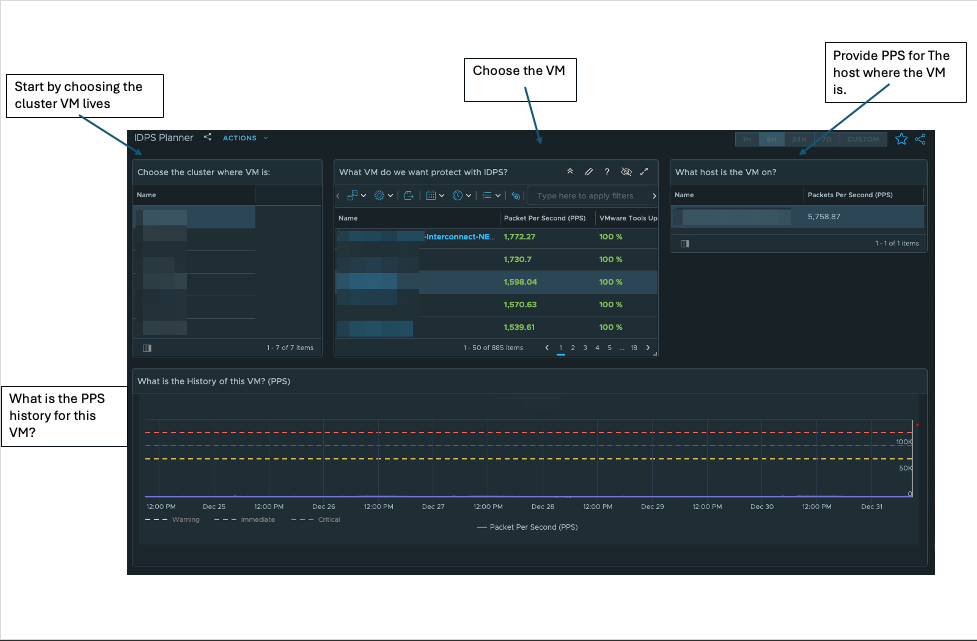
Distributed Firewall (DFW) has been a key concept in security datacenter for about a decade. The ability to do an L3-L7 firewall with inline speed and very low resource consumption is one of the critical aspects of vDefend (DFW). IDPS adds another layer of visibility but comes at a higher cost when it comes to computing resources.
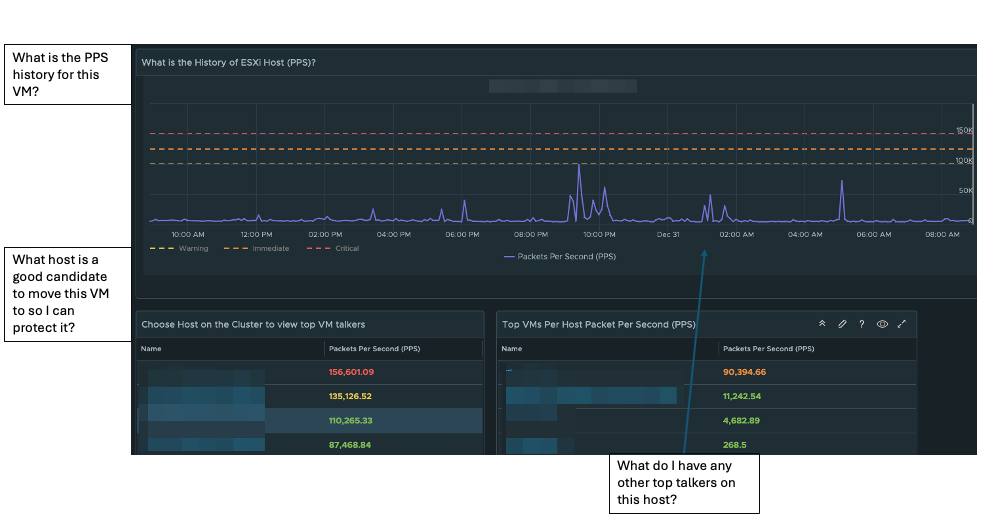
To help plan to gain IDPS visibility and protection for sensitive/crown jewel applications, I have created a vRealize Operations (vROps) dashboard to assist with planning.
In the first half of the dashboard, you will choose the VMs you want to gain IDPS visibility/protection. As of NSX 4.2.1, you want to keep the number of Packets Per Second (PPS) under 150K; anything over 150K per second will cause packets not to be inspected. It will fail open so as not to interrupt the data plane (data flow).
The second half of the planner shows the host’s PPS history and other VMs on that host. One thing to note about the history of PPS is backup windows and other activity that might cause large spikes regularly.
How to create an IDPS Planner:
In vROps:
Go to configure – > Policy – > Policy Definition – >
Edit the Default Policy (Click Edit Policy)
Click on Metrics and Properties
Select Object Type, choose vCenter
Host System
Virtual Machine
Metrics -> Network -> Packets Per Second change to Activate
After you Activate both, go to Visualization, choose Dashboard
Manage
click on three dots (…) and import dashboard zip
click on views
manage
click on three dots (…) and import each view zip file
The zip file will have two zip archives, one for views and one for the dashboard. Make sure to unzip each archive.
In today’s digital landscape, where cyber threats are more sophisticated than ever, enterprises need powerful solutions to safeguard their systems. VMware vDefend Malware Prevention is a robust malware tool designed to protect cloud environments by integrating security directly into VMware platforms.
How It Works
Monitors for malware though VMTools guest introspection capabilities.
Multi-step approach to return verdict on the file quickly and with little resources as possible.
Full emulation in the cloud if verdict can not given though on premises process.
Future-Ready Protection
VMware vDefend Malware Prevention works at the virtualization level, making it a proactive and adaptive choice for modern cybersecurity challenges. By embedding protection into your IT infrastructure, it ensures resilience against evolving threats.
In today’s digital landscape, cybersecurity threats are constantly evolving, and organizations must adopt advanced solutions to stay ahead of malicious actors. VMware’s vDefend Network Detection and Response (NDR) emerges as a robust solution designed to safeguard enterprises against sophisticated cyber threats. This blog explores the features, benefits, and real-world applications of VMware vDefend NDR.
What is VMware vDefend NDR?
VMware vDefend NDR is an integrated cybersecurity platform that provides advanced threat detection and response capabilities for network environments. It leverages machine learning, behavioral analysis, and real-time threat intelligence to identify, block, and remediate cyber threats across the data center landscape
Designed to enhance an organization’s network security posture, vDefend NDR seamlessly integrates with VMware’s existing virtualization.
Key Features of VMware vDefend NDR
Real-Time Network Threat Detection:
vDefend NDR utilizes advanced machine learning algorithms and behavioral analytics to detect anomalies and malicious activities across network traffic in real time.
Threat intelligence feeds from global sources enhance its ability to identify emerging network threats.
Automated Incident Response:
Integration with VMware’s NSX platform allows for precise micro-segmentation and enhanced network security.
Benefits of VMware vDefend NDR
Enhanced Network Visibility:
Gain unparalleled visibility into network traffic and behavior.
Centralized dashboards provide actionable insights and facilitate proactive threat management.
Reduced Response Time:
Automation and orchestration reduce mean time to detect (MTTD) and mean time to respond (MTTR) to network incidents.
Conclusion
In an era where cyber threats are more sophisticated than ever, VMware vDefend NDR provides a powerful, integrated approach to securing modern networks. By combining advanced detection, automated response, and multi-layered protection, it empowers organizations to defend against evolving threats and maintain resilience in the face of cyber challenges.
Invest in VMware vDefend NDR to protect your network assets, ensure regulatory compliance, and secure your path to digital transformation.
Domain Generation Algorithms (DGAs) are methods used by malware to generate numerous domain names for communication with command-and-control (C&C) servers. This approach allows attackers to bypass detection mechanisms that block specific domain names or IP addresses.
The DGA process includes:
Algorithm Implementation: The malware incorporates a DGA algorithm.
Seed Value: The algorithm uses a seed value, such as the current date, to start domain generation. Domain Generation: It applies mathematical operations to the seed value, producing a random domain name.
Domain Resolution: The infected device tries to resolve the generated domain name. C&C Communication: If resolved to a legitimate C&C server, communication is established.
Key Characteristics include:
Large Domain Space: DGAs can generate numerous domain names, complicating blocking efforts.
Dynamic Generation: New domains emerge periodically, challenging existing security measures.
Evading Detection: By frequently changing domain names, DGAs evade traditional detection.
Resilience: Blocking some domains does not hinder communication through others.
Volume of Domains: The large number of generated domains makes complete blocking impractical. Legitimate-Looking Domains: Some domains closely resemble legitimate names, complicating detection.
vDefned Mitigation Strategies involve:
Dynamic DNS Blocking: Quickly blocking newly registered malicious domains.
NTA Behavioral Analysis: Detecting malicious activity based on behavior, regardless of domain.
Threat Intelligence Sharing: Sharing knowledge of known DGA families to enhance detection.
Sandboxing and Virtualization: Analyzing suspicious files in a controlled environment.
Machine Learning: Identifying patterns in DGA-generated domains and anomalies.
A comprehensive understanding of DGA principles and a multi-layered defense strategy enable organizations to mitigate threats from these advanced malware techniques.
When diving into the intricacies of the MITRE ATT&CK Framework alongside the powerful vDefend NTA (Network Traffic Analysis), detecting a multi-stage attack can be both a thrilling challenge and a vital mission. Here’s how you can embark on this critical journey:
Embrace the MITRE ATT&CK Framework: Immerse yourself in the world of tactics, techniques, and procedures (TTPs) wielded by attackers. This knowledge is your weapon, empowering you to pinpoint potential indicators of compromise (IOCs) that are crucial in recognizing the complexities of multi-stage attacks.
Create Your Baseline: Harness the capabilities of vDefend NTA to scrutinize your network traffic and establish a detailed baseline of normal activity. This foundational understanding will serve as a key to unlock the detection of anomalies that could signal malicious undertakings.
Vigilantly Monitor Traffic Behavior: Keep a watchful eye on your network for any unusual patterns. Seek out the unexpected connections to foreign IP addresses, strange protocols in play, or sudden spikes in data transfer. With vDefend NTA, you can visualize these telltale signs, turning data into actionable insights.
Correlate Events with Precision: Leverage threat intelligence to interconnect the events observed by vDefend NTA with the well-documented TTPs of the MITRE ATT&CK Framework. Delve into the stages of the attack—be it initial access, execution, or persistence—by analyzing the activities as they unfold.
Detect and Respond with Urgency: Implement robust detection rules that are finely tuned to the identified tactics and techniques. For instance, should a credential dumping technique rear its head, launch an immediate investigation into potential lateral movements or privilege escalations.
Commit to Continuous Improvement: Following an incident, engage in a rigorous post-mortem analysis to unravel the events leading to the attack. Use these insights to refine and enhance your detection capabilities, ensuring you remain at the forefront against evolving TTPs. By weaving together the MITRE ATT&CK Framework with vDefend NTA, you can dramatically elevate your prowess in detecting and responding to the formidable nature of multi-stage attacks—an endeavor essential for safeguarding your digital landscape.
Example of Traffic Behavior Lateral Movement with Remote Services:
I keep asking myself, is fatigue of hearing about ransomware setting in?
It is understandable if fatigue is setting in, but it can not be stressed enough how important this topic is.
Why is it important? Is it the 4000+ attacks a day? That there is a successful attack rate every 11 seconds or the $20B+ damage in 2021?
Nope, the why is “Your data has value, and your data can cause harm to your business, employees, and customers.” I tell customers, “A Ransomeware attack is as devesting or more devesting than a disaster.”
That brings us to my 1st lesson learned; I can recall a customer over ten years ago that lost its infrastructure to what would now be considered a simple malware attack that formated C:\. This month, I worked with a customer hit with a more sophisticated attack that corrupted all VMFS volumes and destroyed Active Directory infrastructure. The common thread was the sheer panic of how do I recover? Have we not advanced in this space over the last decade?
Thre is an endless array of recovery technology that backups and recovers applications from VMware Cloud Disaster Recover to Veeam. The technology is there, but the process is not in many cases.
Have Immutable Backups Ready
Practice, Practice, Practice Recovery!
Not sure saying practice three times is enough; the ability to recover promptly is the number one thing you can do to protect your business from data loss and paying a hefty ransom.
Now Lets Talk about where Ransomware is toady.
Ransomware is no longer just a single attacker; it is full fledge business to make profits, including distributing the technology to anyone willing to pay them a percentage of the ransom.
Double exfiltration is now common in all attacks. Let’s put that in context, and the attacker will extract your data and then either encrypt or destroy your infrastructure and data. Attackers want to have the only copy of your data, enhancing your chances of paying for it.
Security Is A Team Sport
Let’s talk about protecting your data; this is a vast topic covering multiple technologies, governance, and compliance entities.
My last couple of blogs covers layered network defense and NIST compliance. I will sum it up by saying layer your network defense from the perimeter to the data source with micro-segmentation.
Identity Management is a critical protection for your data; 76% of attacks gain privileged access to carry out and avoid detection. Limiting privileged access is a massive step in the right direction.
Endpoint Protection with NGAV and EDR has become 1st thing people think of when it comes to ransomware protection. For a good reason, this is where attacks start. The ability to see unusual behavior between correlated endpoints is as powerful as seeing unusual behavior on IPS/IDS software on the network. To be clear, one is not better than the other they complement each other in a holistic approach.
As we advance in reading telemetry data from both EndPoint Detection Response (EDR) and Network Advanced Threat Protection (ATP) with different ML/AI techniques, we can detect and prevent a large number of attacks. The cynical side of me worries that now Ransomeware is a well-funded business because our attackers will also gain the advantage of ML/AI.
Will you allow your assets escape.
Let’s not forget the basics of IT hygiene. updates, patching, following security guidelines from each vendor. Remember to trust but verify; make sure you check to ensure these guidelines are followed and updated. Early we talked about privileged account access making up 76% of attacks, and doing IT Hygiene will help stop the other 24%.
In summary, assess your security gaps, layer in process, and technologies for Endpoint and Network Protection. Protect and recover your data! Practice, Practice, Practice recovery!
To close out, I want to share one last word of wisdom “Security is a team sport.” It takes every employee in a business to ward off today’s attackers.
For many years we used the build castle analogy to secure your environments. Is it time for a change?
In today’s world, where we have malicious actors attacking your datacenters every minute of the day with various attacks from Malware to Ransomware, to name a few, we need to protect and detect these acts before they cause harm.
NSX-T 3.2 needs to be a vital part of protecting and responding to attacks from malicious actors.
Let’s start with the outer haul of your cargo ship, your perimeter security. The haul has physical security, of course, and communication, a.k.a network security that uses a next-generation firewall (NGFW) that secures data transmission.
Special Note: Drawings are simplified
There are many techniques used to build this haul that we can cover later. Let’s stay with the analogy, keep it super simple (KISS) and add some floors to this ship. My thought process is to use hardware-based NGFW to control communication/traffic flows between the floors. Wait, I thought this was a blog on protection with NSX-T 3.2; rest assured, we are getting there. KISS right? You will not change or rebuild floors of your ship very often, if ever, so let’s create zones( AKA floors) where security enforcement at hardware-based NGFW.
Special Note: When it comes to mixing HW and SW with various protect techniques, you want to KISS and gain the advantage of looking at traffic in multiple ways and giving flexibility in protecting your most valuable assets.
Now let’s introduce NSX-T 3.2, which brings the control points closer to the applications (AKA Cargo) where you can configure or reconfigure cargo holds. Let’s think about that for a minute, the ability through automation and manual software changes can change behavior and control points. I am now thinking about Network as a Service (NaaS) or Security as a service (SecaaS). We can create a new cargo configuration in test and development before applying it to production.
With the distributed model expanding beyond Distributed Fire Walls (DFW) or Internal Segmentation Firewalls (ISFW) are now Distributed Next-Generation Firewalls (DNGFW). With the integrations from the Lastline acquisition, NSX-T 3.2 can provide distributed Advanced Threat Prevention (ATP) with malware prevention for known and zero-day malware. Distributed behavioral IDS looking for pattern matches and other anomalous traffic.
Ok, let that sync in for min; let’s talk about more distributed goodness! Network Traffic Analysis to see lateral movement anomalies. Network Detection and Response (NDR) to help provide relief from alert overload with MITRE ATT&CK visualize campaign view.
You end up with a cargo ship with disturbed security to protect and detect malicious attackers. Look at all those reconfigurable doors and control points I have negative now as a malicious attacker.
DNGF protection is closest to the source.
We have covered one way to protect with NSX-T; we touched on detect. We will dive deeper into detecting using telemetry and management tools soon. We will also cover using Carbon Black to respond and different recovery strategies. Stay tuned to hear more about VMware Security or reach out and ask how VMware can help secure your business.
With recent cyberattacks across the world, it is essential to have a solid design for security. VMware has recently bought multiple security solutions to help create an intrinsic security portfolio. I will always contend that security solutions should have numerous vendors, so let’s use Cisco to do the switching and routing with ACI in network-aware mode and Palo Alto firewalls with Panorama.
In today’s modern data centers, the number of physical devices is shrinking to under 3% of total servers. We still need to account for them in our design from both network and security perspectives; of course, the virtual environment will need hosts and storage to run on. Let’s start with Cisco fast switching transport underlay.
Using typical spine and leaf architecture for the switching underlay, let’s set up ACI zones with VRFs following the Purdue model.
Internet-facing DMZ – Zone 5+
User Networks – Zone 5
DataCenter – Zone 4
IDMZ – Sub Zone of 4 some will call it 3.5
OT – Zone 3 and below is not part of this design.
All traffic within a single zone will East/West traffic and have further segment and security controls via NSX. All traffic between zones with travel North/South and will pass through the Palo Alto Firewall. These zones are overlay constructs that will provide the underlay for NSX.
ACI Zone will host all physical devices, including server hardware for ESXI, NFS Storage, EUC devices, and other legacy items like LPARS. ACI is switching fabric, and the only way to secure devices is through ACLs. A good thing change rate for physical devices is tiny and is an exception to the rule that requires either manual configuration or custom-built automation. If the change rate is low, 2-3 changes a year, I recommend a well documented manual process.
Now let’s add in NSX; we will start with edge cluster and T0s for management, data center, and the IDMZ. The T0s will route traffic to the corresponding ACI Zone. The edge device can provide stateful firewall services to help further segment the workloads. If attackers were to gain access to the ACI zone, they would not have access to corresponding NSX networks.
Now we can do some exciting things; we can create multiple T1’s to create more separate and secure networks with stateful firewalls and transport zones to control who can talk to who. In this case, we will use HR, FIN, and Call center for the use case, but you could replace ACI zones or create DMZ’s all within NSX. We will generate transport zones so the HR can talk FIN but not Call Center, and Fin can talk to Call Center. We have now created smaller attack services, making it difficult for attackers to move around your network.
So I have an ACI zone that layers above my physical switch’s that can’t see the NSX network without passing through a stateful firewall. If the attacker gained access to inside T0, the T1’s would provide another control point, and beyond that, transport zones can restrict access further.
Let’s add the last layer, Microsegmentation, by using DFW. Firewall as close to source VM as possible at the hypervisor! A distributed firewall that travels with VM to secure the application. Let’s count the doors the attacker has to get through now:
Perimeter Firewalls
ACI Zone
NSX T0
NSX T1
DFW (Microsegmation)
That’s a lot of doors to open and a lot of firewall rules to manage. Let’s walk through how we can manage this potential operational nightmare.
Let’s simplify things to start doors, one through four rule sets should not change often. These doors rule sets only change when making changes at physical or infrastructure levels. Changes to door three and four (T0/T1) can be day two actions in vRealize Automation (vRA).
DFW is applied through security tags that can be used both on VM creation in vRA or as an onboard process. Tags are added in the cloud template and have portable ymal code for new VMs. A workflow will need to be created to add security tags to an onboarded VM.
Ok, so I can manage the addition and change though policy and tags for my VMs, how do I get a handle on all the rules I need to make? Two ways you can use vRNI to generate a report on ports and protocols for each of your applications or use NSX Intelligence that will make rule suggestions inside of NSX that you can apply. Yes, that is right, rules are given to you apply within NSX!
Ok, this sounds great, but how do I make sure network and security policies are in a known good state? How can I visual see my entire network? I need to be able to do this across virtual, physical, and even my SD-WAN.
No problem! Let me introduce you to vRNI with SD-WAN and visibility/assurance. With these two add ons, you will get a visual of the entire network! Virtual, Physical, and even SD-WAN is giving you a complete view of your network. Assurance will allow you to see changes in the whole network on 30 min intervals. An attacker or Jr network admin change an ACL in ACI? Get an alert so you can react or trigger an automation to change your configuration back to a gold standard.
vRNI has grown-up other ways it can be useful is for vRNI to tell vROPs about application groups or use HCX fling to create application move groups for migration with HCX.
You can see deep security posture and the ability to monitor and assure you are in a known good state. Now let’s talk about Advance security with IPS/IDS and Carbon Black.
To honestly say we covered 6 of 12 MITRE attacks tactics, we have to add AVI and WAF for credential access to our applications. We were now adding NSX IPS/IDS for real-time deep packet inspection, automatic signature updates, and giving you the latest defense to alert on and drop or reject traffic.
Wow! 5 doors to unlock and security to catch attackers in the act; I feel safer now. But what if someone does get through to an endpoint?
Carbon Black can help with Next Generation anti-virus with anomaly traffic detection that can stop malware, ransomware, and next-gen attacks in their tracks. EDR can provide seamless detection through threat hunting and containment. Carbon Black cloud will inspect devices and track and report on a drift. Say an attacker broke through all the security above, you have a way to see what was touched to respond appropriately.
Well, there you have intrinsic, intent-based security from VMware. The best news is this just the start with recent acquisitions, LastLine and Salt Stack. The Intrinsic and intent-based security story from VMware is only getting started.