

Cold open: 2:14 AM, and nobody can answer the question
At 2:14 AM, Priya Raman’s phone lights up. The SOC’s perimeter sensor has flagged an exploit attempt against the inference gateway in front of Prairie Lake Group’s new customer-service AI. The CVE behind it went public at 9:00 PM, and a working proof-of-concept was on GitHub by 10:30.
She calls the on-call network engineer. Darnell Brooks picks up on the fourth ring.
“Darnell, it’s Priya. Sorry. The perimeter just caught someone going after the inference gateway. That CVE from last night.”
“Already?” He’s sitting up now, reaching for the laptop. “That thing’s been public for, what, five hours?”
“And there’s a PoC on GitHub. I need to know if they got past the front door. What are we seeing east-west?”
Darnell opens NSX Manager. He has firewall rule hit counts. He has flow records. What he doesn’t have is anything watching how the workloads inside the private cloud are behaving.
“Give me a second.” The second turns into a minute. “Okay. I can see which rules fired. I can’t tell you whether those inference pods are talking to anything they shouldn’t.”
“So that’s a no.”
“It’s an I don’t know.” He rubs his eyes. “Which is worse.”
Prairie Lake is fictional. The clock is not.
The Zero Day Clock is a public scoreboard built from CISA KEV, VulnCheck KEV, NVD and Shadowserver honeypot data. Its numbers explain why Priya’s phone rang before anyone could patch:
- 72,812 CVEs were published in the first nine months of 2026, and 846 were newly listed as exploited.
- In the first half of 2026, 137 of 487 newly exploited vulnerabilities were already under attack the day they went public.
- New CVE volume in the latest quarter ran at 270% of the same quarter last year: about 30,000 records against 11,000.
- VulnCheck reported that 28.3% of exploited vulnerabilities were weaponized within 24 hours of disclosure (The Collapse).
- In June 2026, AI-assisted research turned public patches into working exploit proofs-of-concept, the first in about an hour; a full Windows kernel escalation chain took 31 minutes. The researchers’ phrase for it: N-day has become N-hour (source).
The patch window for a GPU host running production inference, a VKS cluster serving field crews, or a tier-1 ERP database is measured in weeks. The exploit window is now measured in hours. You cannot patch at the speed of the clock, but you can see at the speed of the clock. This is the story of how Prairie Lake’s operations teams learned to do that, and handed the SOC the answer Darnell couldn’t give.
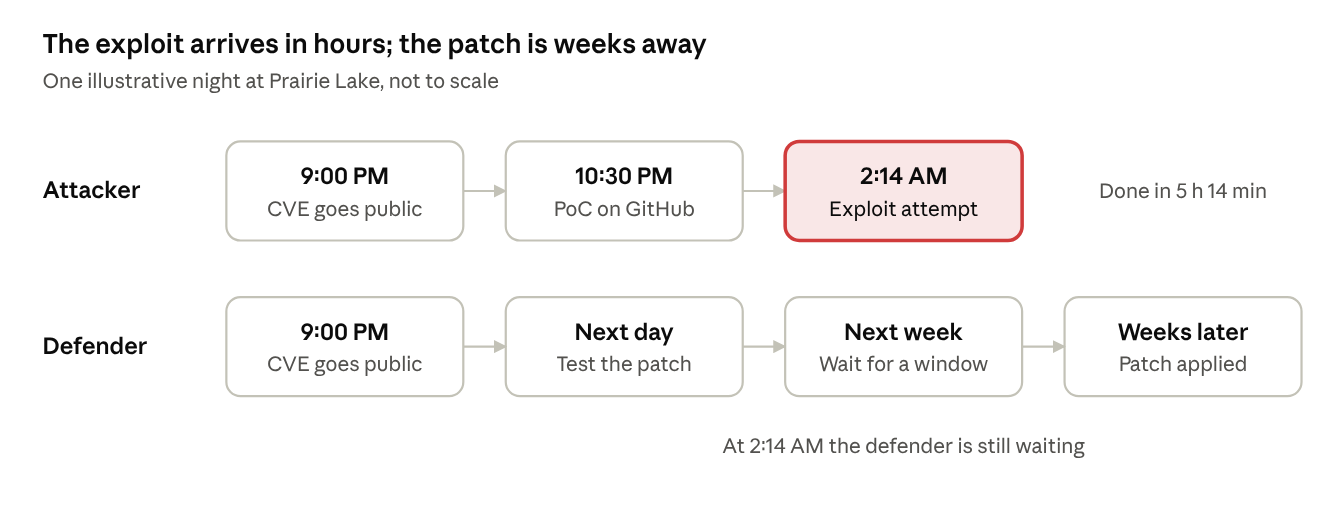
attacker vs defender timeline · one night, not to scale
The attacker finished in about five hours; the defender had not yet reached the maintenance window. And according to the FBI, five hours is starting to look slow.
The newest threat: the attacker is now an agent
On November 13, 2026, the FBI published FLASH-20261113-001, a threat overview of ARTEX, an autonomous, multi-agent penetration testing platform. It plugs into large language models, chooses its own next step and chains techniques together. In the FBI’s words, it “lowers technical barriers for conducting complex intrusions.”
- Since at least August 2026, attackers have used it against financial services, government, technology, defense, semiconductor, energy, healthcare, manufacturing, telecommunications and legal organizations.
- Under three hours: some intrusions went from initial targeting to privileged access in under three hours.
- Real damage: personal information on about 67,000 people taken from South Korean financial institutions, and a supply chain compromise through ConnectWise Cloud Backup that opened access to more than 2,250 downstream tenants.
- It isn’t going away: the developer pulled the GitHub repository in October, but forks, archived copies and a commercial version (ARTEX PRO) still circulate. Researchers counted over 1,600 publicly exposed ARTEX consoles in early November.
The advisory’s recommendations focus on the edge and on identity: inventory what faces the internet, restrict admin interfaces, harden Entra and service principals. All of that is necessary. But its ATT&CK table shows where the intrusions went next, and it was inside. ARTEX poisoned name resolution to steal credentials, harvested Kerberos service tickets, used DCSync to steal the domain’s krbtgt key, and tried WinRM and Pass-the-Ticket to reach domain controllers. Those moves happen east-west, where the perimeter can’t see and the identity provider doesn’t look. It is exactly the gap Darnell couldn’t answer at 2:14 AM.
What the FBI saw inside, and what vDefend puts in the way
| What the FBI saw ARTEX do | What blocks or flags it in a vDefend private cloud |
|---|---|
| Poison LLMNR/NBT-NS and relay SMB to steal credentials (T1557.001) | NTA’s LLMNR/NBT-NS Poisoning and Relay detector. It ships off; turn it on. |
| Enumerate Active Directory (over 110,000 objects), read LAPS passwords, Kerberoast, DCSync | IDPS on Active Directory first (ATP stage 2), plus the NDR Sensor’s SMB detectors for SharpHound- and AdFind-style recon |
| Move toward domain controllers with WinRM, Pass-the-Ticket and Kerberos relay | DFW: allow WinRM and other admin protocols only from admin jump hosts. Security Intelligence shows who uses them today, so the rule comes from evidence |
| Tunnel command and control through Chisel, SoftEther, SOCKS and residential proxies | NTA Netflow Beaconing and Destination IP Profiler |
| Send command output to rotating webhook.site endpoints | NTA Data Upload/Download, plus a DFW FQDN egress allow-list so servers reach only the internet destinations they need |
| Call LLM APIs such as api.deepseek.com, api.anthropic.com, open.bigmodel.cn and api.x.ai | A DFW FQDN rule that lets only your approved AI gateway reach external model APIs; any other caller is dropped and logged |
| Go after admin interfaces, including hypervisors and backup platforms | The FBI says restrict them to trusted networks. DFW enforces that in the hypervisor: vCenter, ESX management and backup consoles reachable only from admin jump hosts |
Source: FBI FLASH-20261113-001, ATT&CK table and indicators. The vDefend column is our mapping, not the FBI’s. The FBI lists the LLM API calls as indicators to investigate alongside other activity, not as proof on their own, and asks you to vet its indicators before blocking them.
Your move: read the flash with your SOC lead this week, vet its indicators and load them into a SIEM watchlist. Then ask your own version of Priya’s question: if an agent got in tonight, what would we see east-west?
Meet the cast
Prairie Lake Group is a fictional enterprise running its business on a VCF 9.1.1 private cloud. Five people own a piece of this story, and only one of them sits in the SOC.
| Persona | Role | Owns | What keeps them up at night | What they need |
|---|---|---|---|---|
| Maya Chen | VCF / Virtual Infrastructure lead | vCenter, ESX hosts, vSAN, cluster capacity, lifecycle | “Security” landing on her GPU hosts and eating cycles meant for inference | Proof that security services fit inside her capacity plan |
| Darnell Brooks | Network Operations engineer | NSX 9.1.1, DFW policy, Security Services Platform (SSP) | Being asked “what happened east-west?” with nothing to show | Telemetry he can hand over without a war room |
| Priya Raman | SOC lead analyst | SIEM, triage, incident response | Alert fatigue: hundreds of signature hits, few real attacks | High-fidelity alerts with context she can act on |
| Tomás Reyes | AI platform owner | Private AI Foundation (PAIF) with NVIDIA NIMs, RAG and agentic pipelines on VKS | A poisoned model, a stolen vector store, or a hijacked agent | Protection that never touches GPU throughput |
| Ellen Hart | CISO | Risk, compliance audits, the board conversation | Telling the board “we didn’t know” | A defensible, measured detection program |
The twist in this story is ownership. Maya and Darnell build and run the detection fabric; Priya consumes it. The SOC cannot see inside the private cloud unless operations decides to light it up.
Act 1: Operations builds the platform
The Monday after, Ellen walked into the operations stand-up holding a printout of the FBI’s ARTEX flash. She’d circled one line: under three hours.
“I’m not asking for a new tool,” she said. “I’m asking for an answer. Next time Priya calls at two in the morning, she gets one from inside the private cloud. How long?”
Maya looked at Darnell. Darnell looked at the ceiling. “Honestly? The platform’s about a week. Making the answer good takes longer, because the detectors have to learn what normal looks like first.”
“Then start the week today.”
The foundation for that answer is the vDefend Security Services Platform (SSP), and operations owns it.
Broadcom describes SSP as a scale-out data lake that ingests flow records and telemetry. It runs the services this story depends on: Security Intelligence, Network Traffic Analysis, Malware Prevention and Network Detection and Response.

vDefend ATP architecture · hosts, NSX Manager, SSP 5.2, SOC
Operations owns the hosts, NSX Manager and SSP; the SOC only sees what SSP sends across the line, which is why this story starts in operations.
The release train
| Component | Version | What it brings to this story |
|---|---|---|
| vDefend / NSX on VCF | 9.1.1 (NSX Manager build 25691509, Sept 3, 2026) | Air-gapped IDPS, Malware Prevention and NDR; resizable IDPS Turbo Mode |
| Security Services Platform | 5.2 (Aug 12, 2026) | IDPS capacity dashboards, ATP guided workflow, on-prem malware sandbox, NTA detectors on by default |
| License Hub for vDefend and Avi | 2.0 | Required for vDefend 9.1 subscription license files |
Maya’s sizing decisions
Maya’s first question was the one every VI admin asks, and she asked it before Darnell had finished his coffee: “Before anyone says ‘just turn it on,’ what does this cost me in cores?” SSP 5.2 gave her real choices.
- Form factors: Medium (3 controllers and 2 workers, the lighter footprint), Large and X-Large. Broadcom’s leaner model starts at 32 CPU cores and cuts physical server use by up to 33%.
- One installer, many platforms: a single SSP Installer deploys and manages up to five independent SSP instances.
- Design guidance: the Security Services Platform for VCF blueprint now ships inside the core VCF 9.1 design documentation.
- Air gap: every SSP feature, including threat-feed updates, runs fully offline. That settled the debate for the regulated zones that are never allowed to reach the internet.
Darnell’s install-day checklist
Darnell pulled these straight from the release notes before touching anything:
- Convert 25-character keys to subscription license files and install License Hub 2.0. Disconnected sites also need a usage upload every six months.
- Upgrade the SSP Installer first, then upload the new SSP package.
- Uninstall any older Malware Prevention Service before moving to SSP 5.2; the cloud sandbox is gone.
- After moving hosts from 9.0.1 to 9.1.1, watch for Security Services Health Degraded. The SCRX service may not be running; restart nsx-scx (issue 3750366).
- Raise the ESX remote syslog message size to 4096 when DFW is active, so security logs are not truncated.
- Use one-click activation for Security Intelligence, NDR and NTA.
By Friday the platform was up. It had not blocked a single packet. What it had done was give Maya something she had never had before: numbers about security’s consumption cost to her hosts.
Your move: pick your SSP form factor from the VCF 9.1 blueprint this week, and put License Hub 2.0 on the same change calendar. Both are prerequisites, and neither takes long.
Act 2: Measure the hungriest engine first
Of every service in the vDefend stack, distributed IDPS asks the most of a host’s CPU and memory, because it inspects packet payloads against thousands of signatures. SSP 5.2 ships dashboards that measure that cost before and after you turn it on, and that is what won Maya over.
Her fear was specific, and she said it out loud in the capacity review. “DFW I’m fine with. It decides in the kernel and it’s cheap. IDPS is different. You’re carving a CPU and memory reservation out of every host for the SCRX inspection engine, and on the GPU hosts every core is already promised to inference.”
“So let’s measure it,” Darnell said. “Before and after. If the numbers are bad, we don’t run it there.”
What SSP measures out of the box
The new IDS/IPS Operational Monitoring Dashboards answer Maya’s questions in her own language:
| Maya’s question | SSP 5.2 metric |
|---|---|
| Can this cluster run IDPS at all? | Eligibility analysis and capacity planning per cluster and host |
| What does it cost the host? | Host CPU and memory |
| What does the engine itself consume? | L7 and IDS/IPS CPU and memory |
| Are we missing inspection under load? | Oversubscription packets per second |
| How much is DFW handing over? | DFW sessions and packets |
| How much work is IDPS doing? | IDS/IPS connections, packets and bits per second |
| Will logging flood the SIEM? | Logging rates |
Every metric exports to CSV through the Metrics API, so the numbers land in the same capacity reviews as vSAN and GPU utilization.
The knobs operations controls
- Turbo Mode (VCF 9.1) raised distributed IDPS from 3 to 9 Gbps per host, and up to 9 Tbps per VCF instance (source).
- Resizable reservation (vDefend 9.1.1): per cluster, the Turbo Mode engine grows from the default 4 vCPU and 4 GB to 8 vCPU and 8 GB, with minimal downtime.
- Higher ceiling: Broadcom’s August update quotes up to 17 Gbps of IDPS per host and 17 Tbps per VCF instance, delivered as a software upgrade (source).
- Exempt actions: trusted bulk traffic, such as nightly backups, can skip inspection entirely.
Darnell ran the eligibility analysis across every cluster on a Tuesday afternoon. The VKS and general application clusters cleared it at the default reservation. The PAIF inference cluster got the larger 8 vCPU and 8 GB reservation, scheduled into its next window and sized against the dashboard instead of a guess.
Maya scrolled through the CSV twice. “Okay,” she said. “That I can plan for.”
Security stopped being a tax Maya feared and became a line item she could plan. But the cheapest packet to inspect is the one IDPS never sees.
Your move: run the IDPS eligibility analysis on one cluster and bring the CSV to your next capacity review. Let the numbers make the argument.
Act 3: The firewall in front of the IDPS
The Distributed Firewall decides first, and IDPS only inspects what DFW allows. Every flow DFW drops is a flow IDPS never spends a cycle on and the SOC never has to triage. Segmentation is a performance feature, not only a security one.
Darnell put it in terms Maya liked. “If the inference gateway has no business talking to the ERP database, why would we pay to inspect that traffic? Drop it at the vNIC. Costs basically nothing.”
“And it never shows up in Priya’s queue,” Maya said.
“Right. That’s half of her 2:14 AM question answered by policy, before any detection engine even runs.”
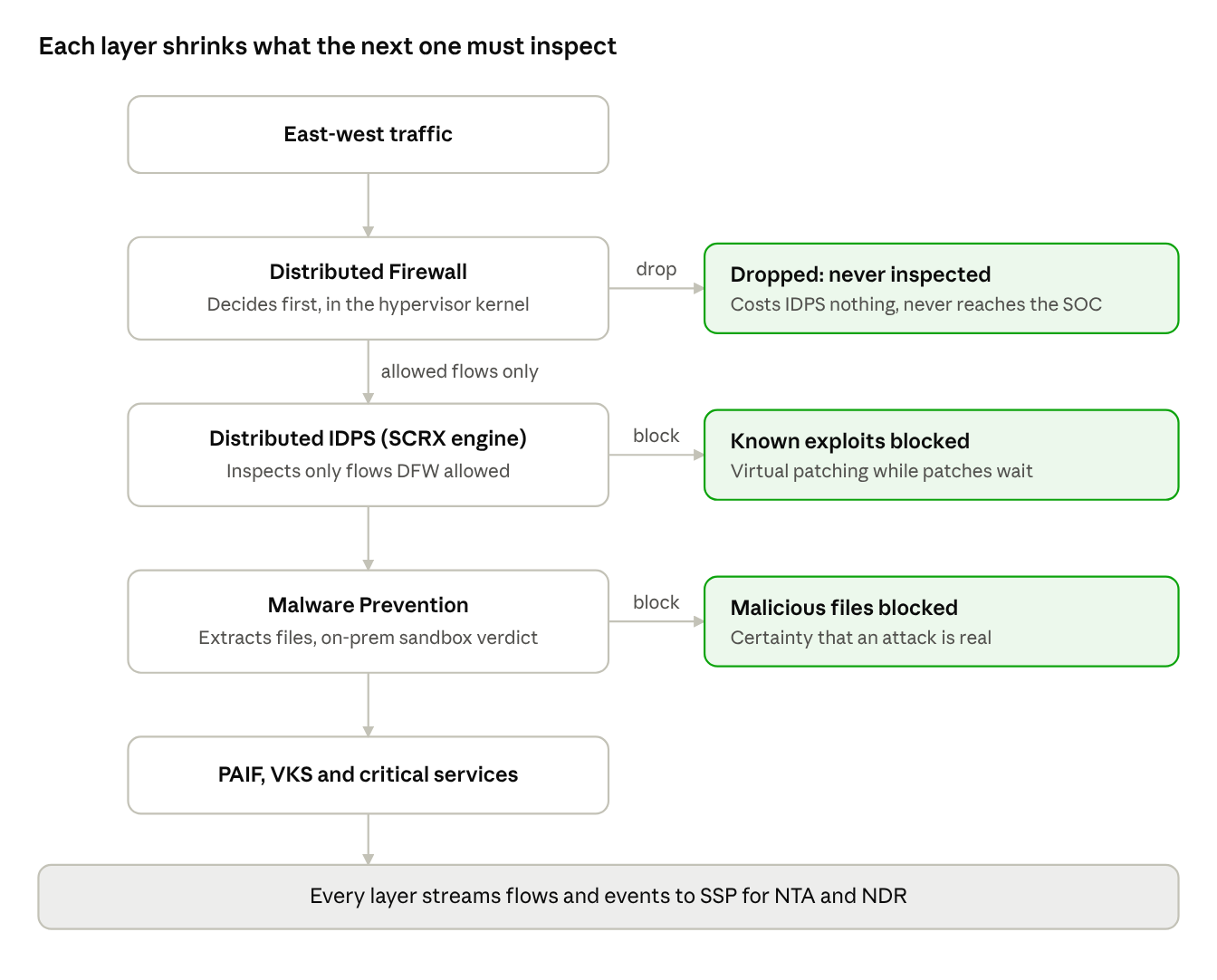
inline enforcement order on each host · DFW, IDPS, Malware Prevention
DFW drops cost IDPS nothing, and everything that survives all three layers still streams to SSP, where behavior analysis picks up what signatures cannot.
Block first, with two guided workflows
Darnell did not build policy from a blank page. SSP 5.2 gives operations two prescriptive journeys:
- vDefend DFW 1-2-3-4 for segmentation. Security Intelligence walks from infrastructure traffic (stage 2) to environment and zone leakage (stage 3) to application ring-fencing (stage 4). It now recommends rules for ephemeral compute such as VKS nodes (SSP 5.2 notes).
- vDefend 1-2-3 for ATP. Stage 1 assesses threat posture across IDPS, NTA and NDR. Stage 2 applies IDPS to shared services such as Active Directory, DNS and NTP. Stage 3 expands IDPS across zones such as DMZ, Dev and Production (source).
The order matters. Shared services come first because every attacker needs them: credentials from Active Directory, name resolution from DNS. SSP’s policy planning generates those distributed IDPS rules from observed traffic, so Darnell reviews rules instead of writing them.
The FBI flash backs up that order. Once inside, ARTEX went after Active Directory, LAPS passwords and domain controllers. Inspect shared services first, and you are inspecting where an agent like that goes next.
What IDPS buys while patches wait
With DFW shrinking the inspected set, IDPS can do its real job: virtual patching. A signature for a newly disclosed exploit protects every allowed flow to a vulnerable workload while Maya waits for a maintenance window. Against a clock that now runs in hours, that gap is the whole game.
IDPS has one blind spot, though. It catches what someone has already written a signature for. The 2:14 AM attack was hours old. Nobody had written that signature yet.
Your move: start DFW 1-2-3-4 at stage 2, infrastructure traffic. While you’re there, lock vCenter, ESX management and backup consoles to your admin jump hosts. The FBI recommends exactly that for hypervisors and backup platforms.
Act 4: Behavior catches what signatures miss
Network Traffic Analysis does not need to know the exploit. It watches what a compromised workload does next, and that is how you see a zero day.
NTA builds a baseline of normal behavior from flow records collected on NSX hosts and NDR Sensors, using ML models and statistical techniques. It flags protocol misuse, unusual traffic patterns and host-level anomalies, then pairs the ML with rule-based analytics to cut false positives. Every detection maps to a MITRE ATT&CK tactic, most detectors work on encrypted traffic, and SSP keeps the telemetry for 30 days (NTA docs).
The attacker’s next move, and the detector waiting for it
| What the attacker does after the exploit | NTA detector | MITRE tactic | On by default |
|---|---|---|---|
| Calls home to C2 on a timer | Netflow Beaconing | Command and Control | Yes |
| Resolves algorithm-generated domains | Domain Generation Algorithm | Command and Control | Yes |
| Smuggles data out through DNS | DNS Tunneling | Exfiltration | Yes |
| Moves sideways over RDP or SSH | Remote Services | Lateral Movement | Yes |
| Reaches an IP it has never talked to | Destination IP Profiler | Other | Yes |
| Stages large data transfers | Data Upload / Download | Collection | Yes |
| Opens odd ports on a critical server | Server Port Profiler | Command and Control | Yes |
| Maps the network | Port Scan | Discovery | No |
| Poisons name resolution to steal credentials | LLMNR/NBT-NS Poisoning and Relay | Credential Access | No |
| Runs SharpHound or AdFind recon over SMB | SMB detectors (NDR Sensor) | Collection, Discovery | No |
Source: NTA supported detectors, SSP 5.2
The defaults are deliberate. High-confidence, zero-learning detectors such as DGA and beaconing fire on day one. Profilers such as Remote Services build host baselines silently before they alert. Noisy detectors such as Port Scan stay off until operations allow-lists legitimate scanners, so the first alerts Priya sees are worth her time.
The urgency nobody talks about: baselines take days
Several detectors need a calibration window before they alert: 6 days for the port profilers, 7 for Remote Services and Port Scan, 10 for the Destination IP Profiler, 14 for Unusual Traffic Pattern. A baseline is a time-based asset. You cannot buy it after the incident. Darnell switched NTA on the day SSP came up, because the best day to start learning normal was before the 2:14 AM call, and the second-best day was today.
Priya asked him why so early. “Nothing’s going to alert for a week.”
“That’s the point,” Darnell said. “The clock on those baselines doesn’t start until I flip the switch. I’d rather it start now than the morning after.”
Behavior tells Priya something is wrong. It does not yet tell her what was delivered.
Your move: turn NTA on the day SSP comes up. Then check for legitimate sources and switch on LLMNR/NBT-NS Poisoning and Relay; it’s one of the credential-theft techniques the FBI saw ARTEX use.
Act 5: Malware Prevention adds certainty
A beaconing alert says a workload is acting strangely. A malicious file verdict on that same workload says why. When the two line up, Priya stops guessing and starts containing.
vDefend Malware Prevention extracts files moving across the network, scores them with static analysis and detonates unknowns in a sandbox for dynamic analysis. With SSP 5.2, that whole pipeline runs on-premises: files, artifacts and metadata never leave the data center, and the old cloud sandbox is retired (SSP 5.2 notes).
That detail ended a six-month argument at Prairie Lake. Tomás had shut it down every time it came up. “I’m not uploading customer data or model artifacts to somebody else’s cloud so they can open them. Neither is compliance. Not happening.”
“It doesn’t leave the building anymore,” Darnell told him. “5.2 detonates on-prem. And it runs air-gapped if we need it to.”
Tomás read the release note himself before he answered. “Okay. Then it’s an ops decision, not a legal one.”
What Maya watches
- File exclusions: known-benign files can skip analysis, which reduces system load. Large, trusted artifacts are the first candidates.
- Submission bursts: surges in concurrent file submissions can overload disk and network and trigger intermittent Service Status Down alarms. The fix is a lower submission rate or more memory, disk and network for the service.
- Upgrade path: any older Malware Prevention Service must be uninstalled before moving to SSP 5.2.
Now Priya has three kinds of evidence: a signature hit, a behavior anomaly and a file verdict. On their own, each is still one more alert in a queue. The question is who connects them before the clock runs out.
Your move: if an older Malware Prevention Service is still installed anywhere, schedule its removal now so it doesn’t hold up your SSP 5.2 upgrade.
Act 6: NDR turns alerts into one story the SOC can act on
Network Detection and Response consumes the detection events from IDPS, Malware Prevention and NTA, then aggregates and correlates them into campaigns mapped to MITRE ATT&CK tactics and techniques (NDR docs). Priya no longer gets a signature hit, a beacon and a file verdict as three tickets. She gets one incident, already in attack order.
The 2:14 AM attack, replayed as a campaign
Here is how the same night reads once the full stack is running:
- Initial access: an IDPS signature fires on the inference gateway, if one exists yet. If it does not, NTA’s Destination IP Profiler sees a pod reach an address it has never contacted.
- Execution: Malware Prevention extracts the dropped payload and returns a malicious verdict from the on-prem sandbox.
- Command and control: Netflow Beaconing and DGA detectors flag the pod’s periodic calls to an algorithm-generated domain.
- Lateral movement: the pod tries SSH toward the ERP database server. DFW drops it, and Remote Services flags the attempt.
- Correlation: NDR groups all four into one campaign on one workload and ships it to the SIEM.
That is a high-fidelity alert: multiple independent engines agreeing about one host, in attack order, with workload context attached.
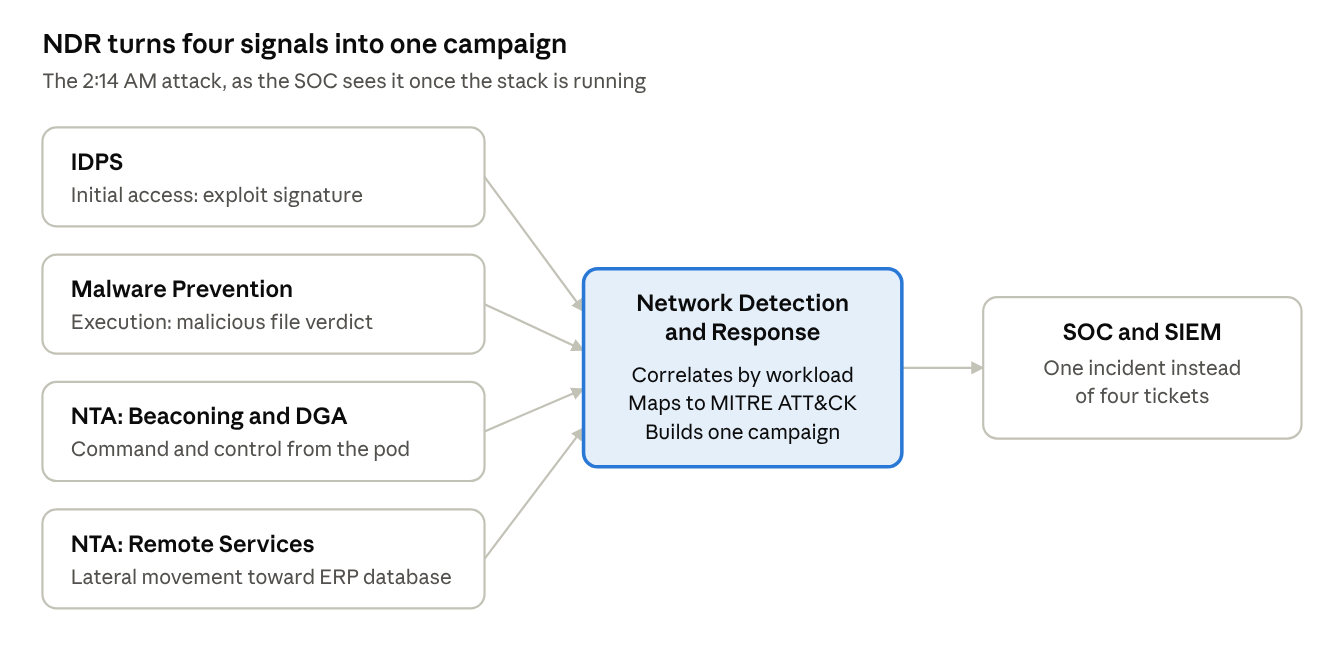
NDR correlation · four detection engines into one campaign
Four engines, one workload, one campaign: that convergence is what lets Priya act at 2:14 AM instead of waiting for morning.
Speed is why this matters more now. The FBI says some ARTEX intrusions reached privileged access in under three hours. An agent doesn’t get tired at 3 AM and doesn’t stop to read logs. The SOC can’t afford to stitch four tickets together by hand.
The handoff contract between operations and the SOC
| Operations provides | Path to the SOC | Priya uses it to |
|---|---|---|
| NDR campaigns | NDR SIEM integration | Open one incident instead of many tickets |
| IDPS, Malware Prevention and NTA events | Feed into NDR | Show evidence behind each campaign stage |
| DFW logs (syslog at 4096-byte messages) | Remote syslog to the SIEM | Prove which lateral attempts were blocked |
| Workload tags and groups from Security Intelligence | Attached to events and campaigns | Know the app, zone and owner without calling ops |
| AI Assistant for Threat Defense | Built into the SSP interface | Get plain-language explanations and remediation policy suggestions |
Response closes the loop. VCF 9.1 Protection and Recovery adds cyber recovery workflows with push-button network isolation through vDefend, so containment is a policy change, not a cable pull.
Your move: decide where NDR campaigns land in your SIEM, who gets paged, and who is allowed to isolate a workload at 2 AM. Write it down before you need it.
Where it matters most: AI, Kubernetes and core business services
The workloads that can least afford an inspection tax are the ones attackers want most. In 2026 so far, the Zero Day Clock attributes 199 newly exploited vulnerabilities to enterprise applications, 150 to network appliances and 117 to developer platforms (Zero Day Clock): the layers AI pipelines and Kubernetes platforms are built from.
| Workload | Why it is high-demand | What attackers want | The vDefend controls that matter |
|---|---|---|---|
| Private AI Foundation (PAIF) with NVIDIA NIMs, RAG and agentic pipelines | GPU hosts with every core promised to inference; latency-sensitive | Model weights, vector stores, and agents that can be steered into tool calls | DFW microsegmentation per RAG and agent stage; IDPS sized with SSP dashboards and the 8 vCPU / 8 GB Turbo reservation; NTA Data Upload/Download and Destination IP Profiler; on-prem Malware Prevention |
| vSphere Kubernetes Service (VKS) | Ephemeral pods and nodes; policy must keep pace with deployments | A foothold in a pod, then movement into shared services | Pod-level IDPS through CNI integration; Security Intelligence rules for ephemeral compute; self-service VPC security profiles in VCF Automation |
| Critical infrastructure services (ERP and payment systems, Active Directory, DNS, NTP) | Rare maintenance windows; audit scope; some isolated networks | Credentials, reconnaissance, and ransomware staging | Air-gapped ATP; IDPS on shared services first (ATP stage 2); zone segmentation; SMB detectors for SharpHound and AdFind recon |
Agentic AI raises the stakes further. Agents reach enterprise tools through protocols such as the Model Context Protocol (MCP), and vDefend engineers pushed for the stateless MCP hardening in the July 2026 MCP specification. For Tomás, that means agent-to-tool traffic is something DFW can allow-list and NTA can baseline, like any other east-west flow.
The ARTEX flash is the other side of the same coin: attackers run agents too, and those agents call LLM APIs. A DFW FQDN rule that lets only Tomás’s AI gateway reach external model APIs makes that kind of call stand out instead of blending in.
Your 90-day plan: start the baseline clock today
The Zero Day Clock logged 846 newly exploited vulnerabilities in the first nine months of 2026, about 94 a month, and the FBI is now watching attackers hand whole intrusions to an agent. Every week without SSP is a week of NTA baseline you will never get back. Here is the plan Prairie Lake ran, by owner. Copy it.
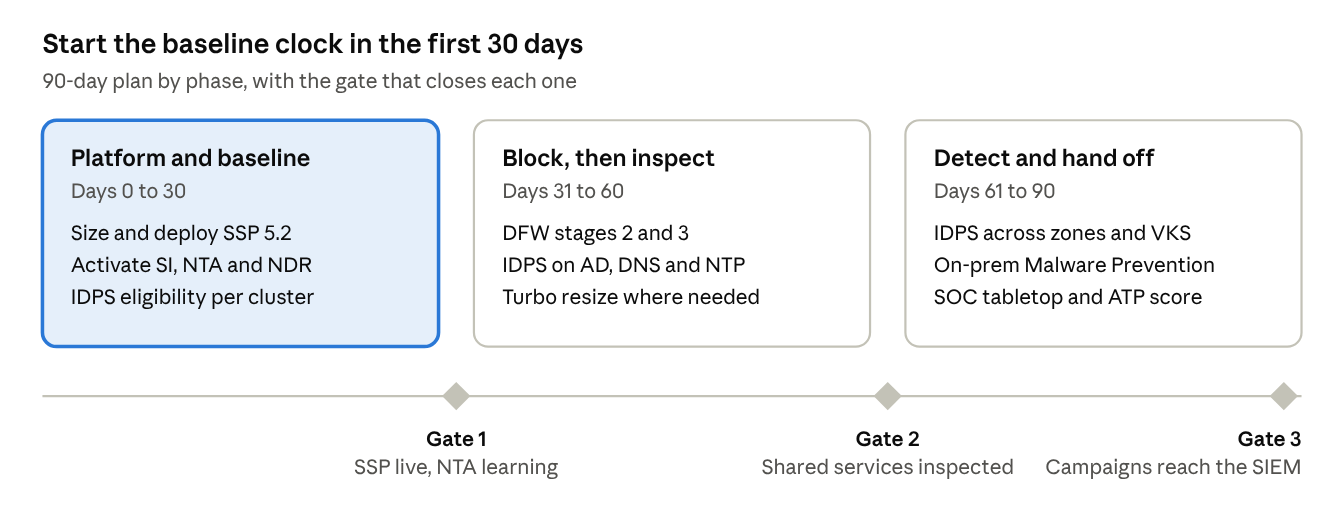
90-day roadmap · 3 phases, 3 gates
Phase 1 is the one that cannot slip: NTA calibration windows only start counting once SSP is live.
Days 0 to 30: platform and baseline (operations leads)
- ☐ Maya: pick the SSP form factor from the VCF 9.1 blueprint and reserve the cores before someone else claims them.
- ☐ Darnell: align on vDefend 9.1.1 and SSP 5.2, and move licenses to License Hub 2.0.
- ☐ Darnell: activate Security Intelligence, NTA and NDR on day one so calibration windows start running.
- ☐ Darnell: run IDPS eligibility analysis on every cluster and export it to CSV for Maya’s capacity review.
- ☐ Priya: define SIEM intake for NDR campaigns and DFW syslog before the first alert arrives.
- ☐ Darnell: restrict vCenter, ESX management and backup consoles to admin jump hosts with DFW.
- ☐ Priya: vet the indicators in the FBI ARTEX flash and load them into a SIEM watchlist.
Days 31 to 60: block, then inspect
- ☐ Darnell: complete the DFW 1-2-3-4: stages 2 and 3, infrastructure traffic and zone leakage.
- ☐ Darnell: run ATP 1-2-3 stages 1 and 2: assessment, then IDPS on Active Directory, DNS and NTP.
- ☐ Maya: apply the 8 vCPU / 8 GB Turbo reservation only where the dashboards show the need.
- ☐ Tomás: map RAG and agent-to-tool flows so DFW can allow-list them.
- ☐ Darnell: allow-list legitimate scanners, then enable Port Scan, Unusual Traffic Pattern and LLMNR/NBT-NS Poisoning and Relay.
- ☐ Tomás: add a DFW FQDN rule so only the AI gateway can reach external LLM APIs.
Days 61 to 90: detect and hand off
- ☐ Darnell: finish ATP stage 3, extending IDPS across DMZ, Dev, Production and VKS pods.
- ☐ Maya: turn on on-prem Malware Prevention with file exclusions for trusted artifacts.
- ☐ Priya: tabletop the 2:14 AM scenario end to end, then run it again as an ARTEX-style intrusion: NDR campaign, SIEM incident, vDefend isolation.
- ☐ Ellen: take the ATP score from SSP’s Security Assessment Report to the board, and track it monthly.
The measure of success is simple. The next time Priya asks “what are we seeing east-west?”, the answer arrives as a campaign, not a shrug.
Epilogue: 2:14 AM, ninety days later
Priya’s phone lights up again. This time it isn’t a perimeter ping. It’s an NDR campaign, already in her SIEM, with a workload name, a zone and an owner attached.
She calls Darnell anyway. Old habits. He picks up on the first ring.
“I’m looking at it,” he says before she can ask. “One inference pod. It’s been beaconing for about twenty minutes. The sandbox says the file it pulled down is malicious. And it tried to SSH to the ERP database, which DFW dropped.”
“Anything else?”
“It tried to poison name resolution on its subnet. NTA caught that too.” A pause. “It’s isolated. Want me to wake Tomás?”
“Let him sleep. Send him the campaign.”
Maya’s GPU hosts never noticed. Tomás’s models never left the building. At 7:00 AM, Ellen gets a three-line summary instead of a board apology.
The clock did not slow down. It never will. Prairie Lake simply stopped trying to patch at the clock’s speed and started seeing at it, and the people who made that possible were not in the SOC. They were the operations teams who decided the private cloud would light itself up.
Prairie Lake Group and its people are fictional. Product capabilities and threat data are drawn from the sources below; the mapping of ARTEX techniques to vDefend controls is ours, not the FBI’s.
Don’t wait for your own 2:14 AM call
Everything in this story runs on VCF 9.1.1 today. The hard part isn’t the technology. It’s deciding to start the clock. Here’s what to do this week:
- Read the FBI ARTEX flash with your SOC lead, then ask the question Priya asked: if something got in tonight, what would we see east-west?
- Put SSP 5.2 on the change calendar. Pick the form factor from the VCF 9.1 blueprint and get License Hub 2.0 in place.
- Turn on Security Intelligence, NTA and NDR the day SSP comes up, so the baselines start learning.
- Lock management interfaces to jump hosts with DFW: vCenter, ESX management and backup consoles.
- Book the day-90 tabletop now, with operations and the SOC in the same room.
Want help scoping it? Talk to your Broadcom account team or partner about an SSP deployment and its Security Assessment Report for your VCF environment.
The clock is already running. Start yours.
Sources
- Zero Day Clock: Observatory
- Zero Day Clock: The Collapse
- FBI FLASH-20261113-001: Threat Overview of ARTEX Autonomous Penetration Testing Framework
- VMware vDefend 9.1.1 Release Notes
- Security Services Platform 5.2 Release Notes
- Network Traffic Analysis, SSP 5.2
- NTA Supported Detectors, SSP 5.2
- Network Detection and Response, SSP 5.2
- VMware vDefend for VCF 9.1: Zero Trust Lateral Security for the AI Era
- vDefend Advances Multi-Layer Lateral Security for the Frontier AI Era
- vDefend Lateral Security Design Blueprints for VCF 9.1
- Protection and Recovery 9.1 Release Notes


Leave a Reply