
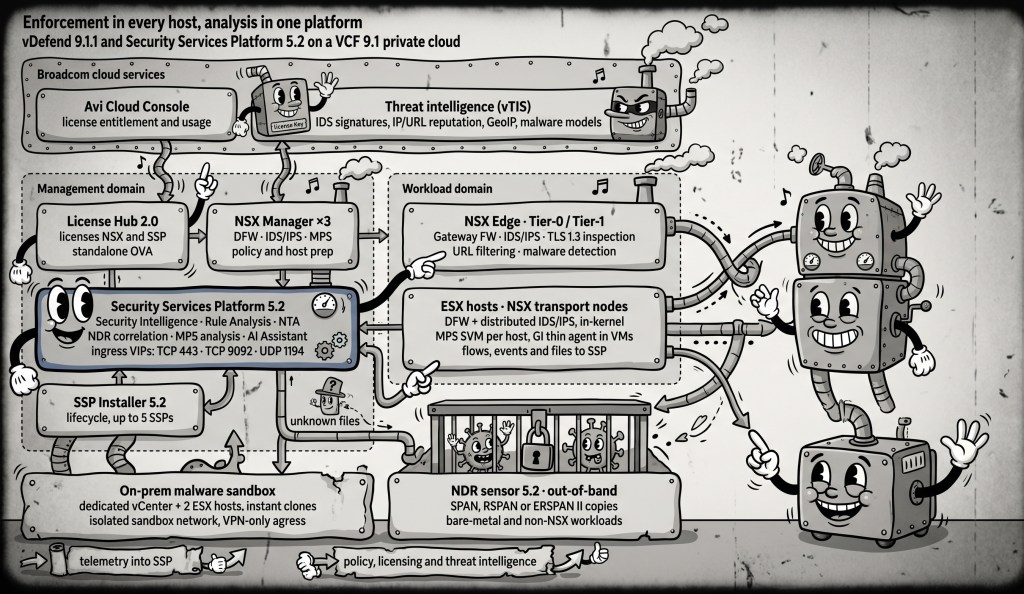
Why this architecture?
Ease of securing the Private Cloud
In a private cloud, much of the traffic that matters never crosses the perimeter firewall: it moves east-west between VMs, Kubernetes clusters and services on the same hosts. vDefend puts the firewall and IDS/IPS in the ESX kernel, next to every vNIC, and Security Services Platform (SSP) 5.2 turns what those hosts see into segmentation plans, detections and malware verdicts.
This reference architecture shows how the pieces fit in a VCF 9.1 private cloud running vDefend 9.1.1. It uses one NSX Manager cluster for policy, one SSP platform for analytics, one License Hub for entitlement, and an on-prem sandbox for malware analysis. Every connection is numbered, from the admin’s browser to the NDR sensor’s SPAN port, and a matching communication matrix gives the port, protocol and direction for each one.
Three ideas run through the design: keep the moving parts few, make day 2 cheaper than day 1, and enforce at every workload rather than only at the edge.
The architecture at a glance
Policy lives in NSX Manager, enforcement lives in every ESX host and Edge, and everything those enforcement points see flows into one Security Services Platform.
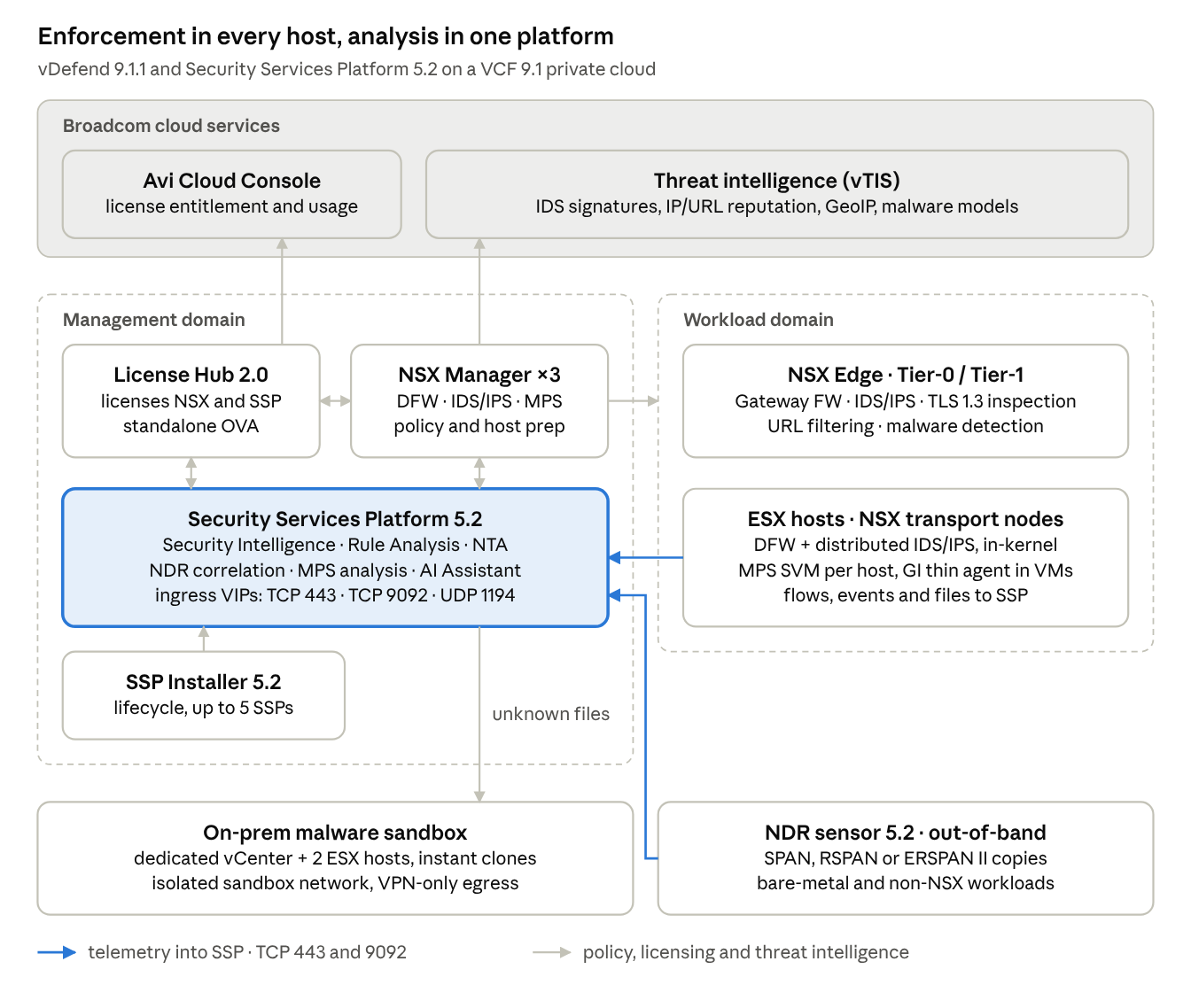
NSX Manager pushes policy to the Edge and to every host; hosts, Edges and NDR sensors send telemetry back to SSP; License Hub licenses NSX Manager and SSP and reports usage to Broadcom. Files the hosts cannot judge locally go from SSP to the on-prem sandbox. The full drawing numbers 36 paths and pairs each with a row in the communication matrix.
Simplicity: fewer moving parts
The whole security stack runs on four things you deploy once: the NSX Manager cluster, the Security Services Platform, License Hub 2.0, and (for malware analysis) a small dedicated sandbox cluster. Everything else is already part of VCF.
- No agents or appliances in the data path. The distributed firewall and distributed IDS/IPS run in the ESX kernel on every transport node, so east-west traffic is inspected where it starts. Nothing is hairpinned to a physical firewall.
- One policy plane. The same NSX Manager cluster holds DFW rules, distributed and gateway IDS/IPS, TLS inspection, URL filtering and malware prevention policy for both the hosts and the Tier-0/Tier-1 gateways.
- One analytics platform. SSP 5.2 hosts Security Intelligence, Rule Analysis, Network Traffic Analysis, NDR correlation, malware analysis and the AI Assistant on a single platform. A single SSP Installer deploys, upgrades, scales and backs up as many as five SSP instances, and 5.2 adds a 2-node form factor.
- Three ingress ports. Hosts, Edges, malware-prevention SVMs and NDR sensors all report to the SSP Service IP pool on TCP 443 and TCP 9092. The only other listener is UDP 1194 for the sandbox VPN tunnel.
- One license service. License Hub 2.0 is a single appliance (6 vCPU, 12 GB RAM, 256 GB disk) that licenses up to 120 vDefend and Avi endpoints. Starting with SSP 5.2, it installs on its own instead of through the SSP Installer.
- Air-gap is a mode, not a redesign. The disconnected design is the same drawing with a few dashed paths: the daily threat-intelligence bundle and the License Hub usage files move by hand instead of over the internet.
Operational value: day 2 gets cheaper
The payoff of this design shows up after go-live, when each team works from the same platform instead of handing tickets across tools.
| Team | Owns in this design | What SSP 5.2 gives them on day 2 |
|---|---|---|
| VI / platform | vCenter, ESX hosts, SSP Installer, License Hub, sandbox cluster | Lifecycle (install, upgrade, scale-out, backup) from one installer; public REST API and Python SDK; LDAP for the installer, Operational metrics for IDS/IPS |
| NetOps / security engineering | NSX Manager policy, Edge gateways, segmentation | Security Intelligence segmentation journey with Security Assessment ,infrastructure, environment and ring-fencing and micro-segmentation rules; Rule Analysis report of unused DFW rules; CSV flow export |
| SOC | Detections, investigations, response | IDS/IPS operational dashboards, NDR correlation, on-prem malware verdicts, AI Assistant for threat defense inside the SSP UI; campaign events forwarded to the SIEM |
A few operating details keep day 2 smooth:
- Run SSP 5.2.0.1. Broadcom deprecated the 5.2.0 build on October 6, 2026; check the release notes for whether your Malware Prevention identity setup requires the newer build.
- Let licensing run itself. In connected mode, License Hub reports usage automatically and retries daily; usage must reach Broadcom at least once every 180 days. Air-gapped sites run the same cycle by hand.
- Keep the matrix with the design. The numbered communication matrix doubles as the firewall request, so network, security and platform teams review and approve the same document.
Securing the private cloud, layer by layer
Every workload gets enforced at its own vNIC, every flow in and out of the cloud passes the gateway, and anything the hypervisor cannot see is still watched out-of-band.
| Layer | Control | Where it runs | What it covers |
|---|---|---|---|
| East-west, L2 to L7 | Distributed Firewall | ESX kernel, every vNIC | Micro-segmentation and ring-fencing between every VM and application tier |
| East-west threats | Distributed IDS/IPS | ESX kernel (SCRX engine) | Exploits and lateral movement between workloads; in 9.1.1 the engine can be resized from 4 to 8 vCPU per cluster to provide up to 17 GBPS of throughput. |
| North-south | Gateway Firewall, gateway IDS/IPS, TLS 1.3 inspection, URL filtering, malware detection | NSX Edge, Tier-0 and Tier-1 | Traffic entering and leaving the private cloud; TLS inspection now runs on both Tier-0 and Tier-1 |
| Files | Malware Prevention | GI thin agent in the guest, one MPS service VM per host | File and fileless (in-memory script) capture; files without a local verdict go to SSP for static analysis, then on-prem detonation |
| Unknown malware | On-prem sandbox | Dedicated vCenter and two ESX hosts | Instant-clone detonation VMs on an isolated, unrouted network; sample traffic leaves only through an anonymizing VPN |
| Beyond NSX | NDR sensor 5.2 | Virtual appliance on a SPAN, RSPAN or ERSPAN II feed | Detect-only coverage for bare-metal servers and non-NSX clusters |
| Correlation and intelligence | NDR correlation, threat intelligence (vTIS) | SSP 5.2, Broadcom cloud | Campaign-level detections across all sensors; signatures, IP/URL reputation, GeoIP and malware models, with a daily bundle for air-gapped sites |
Two changes in SSP 5.2 matter for security teams. Malware file analysis is now strictly on-premises, because the MPS cloud sandbox is deprecated. And Network Traffic Analysis can run on its own, with a core set of detectors on by default.
Connectivity cheat sheet
Licensing is the newest set of flows in a VCF 9.1 design, so here are the License Hub 2.0 paths as Broadcom’s Ports and Protocols tool lists them. Numbers match the badges on the architecture drawing.
| # | Source | Destination | Port / protocol | Purpose |
|---|---|---|---|---|
| 35 | License Hub | NSX Manager | TCP 443 | Register and license the NSX endpoint (DFW, IDS/IPS) |
| 35 | NSX Manager | License Hub Kafka FQDN (Service IP pool) | TCP 9092 | Configuration sync over Kafka |
| 35 | NSX Manager | License Hub Service IP pool, first IP | TCP 443 | Licensing client service and metrics |
| 11 | License Hub | SSP | TCP 443 | Register and license the SSP endpoint |
| 11 | SSP | License Hub Service IP pool, first IP | TCP 443 | Licensing client service |
| 12 | License Hub | portal.pulse.broadcom.com, prod-cdn-downloads.pulse.broadcom.com, prod-cdn-uploads.pulse.broadcom.com, access.broadcom.com | TCP 443 | Connected mode only: Broadcom sign-in, entitlement and license download, usage upload |
| 36 | Admin workstation | License Hub | TCP 443 (UI and API; allow both the appliance IP and the Service IP pool’s first IP), TCP 5480 (appliance management), TCP 22 (optional) | Onboard endpoints, assign licenses, move files in air-gap mode |
The License Hub also needs DNS (53), NTP (UDP 123) and optionally syslog (UDP 514) and LDAP (389, 636, 3268, 3269), like every other management component. If Avi is licensed from the same hub, add the same TCP 443 pair between License Hub and each Avi Controller.
Four details to settle before deployment:
- The Kafka FQDN must resolve to the second address of the two-address Service IP pool; browse to the UI by its FQDN, not an IP.
- Keep round-trip latency from License Hub to NSX Manager, SSP and Avi Controllers at 150 ms or less.
- All four Broadcom hosts in row 12 belong on the proxy allow-list for connected mode.
- License Hub 2.0 is only required when SSP 5.2 connects to vDefend 9.1 on VCF 9.1; SSP 5.2 with vDefend 9.0.x or 4.2.x keeps using license keys.
For telemetry, the rule is short: ESX hosts, Edges, MPS service VMs and NDR sensors send to the SSP Service IP pool on TCP 443 and 9092. NDR sensors must reach SSP by FQDN, without a proxy.
Where to start
You do not have to turn everything on at once. A practical order:
- Deploy the SSP Installer and SSP 5.2.0.1, sized Large or X-Large if you plan to run malware analysis or NDR.
- Deploy License Hub 2.0, register it with the Avi Cloud Console, and onboard NSX Manager and SSP as endpoints.
- Turn on quick set features, let flows build a baseline, then apply segmentation and IDS/IPS via the Security Journey.
- Add distributed and gateway IDS/IPS, then Malware Prevention with the on-prem sandbox.
- Extend detection to bare-metal and non-NSX workloads with NDR sensors on a SPAN or ERSPAN feed.
The result is a private cloud where security is a property of the platform, not a project bolted onto it. Secure your privite cloud today!


Leave a Reply